let, const or var? Variables and Data Types in JavaScript
What variables are, declaring them with let, const and var, the primitive data types, and scope explained simply, with real output

Think of a variable as a labelled box. You put a value inside, write a name on the label, and from then on you use the name instead of the value. JavaScript gives you three ways to make that box: let, const and var. They look interchangeable, and they aren't. One can be refilled, one can't, and one leaks out of places it shouldn't.
This post covers what variables are, the three ways to declare them, the basic data types you'll store in them, and scope, which decides where a box can be seen. Every output is real, from Node.js 24.22.
What variables are and why we need them
Without variables, you'd repeat the same value everywhere you need it. With one, you store it once and refer to it by name:
let studentName = "Asha";
console.log(`Welcome, ${studentName}!`);
console.log(`${studentName}, your course starts on Monday.`);

studentName = "Ravi"; // change it once, every line follows
console.log(`Welcome, ${studentName}!`);
Welcome, Asha!
Asha, your course starts on Monday.
Welcome, Ravi!
Change the value in one place, and every line that uses the name follows. That's the whole point: a variable gives a value a name, so your code says what something is (studentName), not just what it happens to be right now ("Asha").
Declaring variables with let, const and var
All three create a box. The difference is what you're allowed to do with it afterwards.
let makes a box you can refill. const makes a box that can't be refilled:
let score = 10;
score = 15;          // let: the box can be refilled
console.log(score);

const birthYear = 2002;
birthYear = 2003;    // const: not allowed
15
birthYear = 2003;    // const: not allowed
          ^
TypeError: Assignment to constant variable.
score changed from 10 to 15 without complaint. Trying to put a new value in birthYear stopped the program with a TypeError. That's const doing its job: it protects values that shouldn't change.
Because a const box can never be filled later, it has to get its value on the same line it's declared. const total; on its own doesn't run at all: SyntaxError: Missing initializer in const declaration.
One thing that surprises people: const stops you replacing the value, but if the value is an object, you can still change what's inside it:
const user = { city: "Pune" };
user.city = "Mumbai"; // changing what's inside is allowed
console.log(user);
{ city: 'Mumbai' }
The box still holds the same object; only its contents changed. I covered objects in more detail in person.key vs person[key].
var is the original way to declare variables, from before let and const existed. It still works, but it has quirks. Here's the first: it lets you declare the same name twice, silently:
var level = "beginner";
var level = "expert"; // var: no complaint
console.log(level);
expert
With let, the same mistake is caught before the code even runs:
let level = "beginner";
let level = "expert"; // let: refused
let level = "expert"; // let: refused
    ^
SyntaxError: Identifier 'level' has already been declared
Declaring the same name twice is almost always a typo or a copy-paste accident. let tells you; var hides it.
Primitive data types
The value in a box always has a type. These are the five you'll use from day one. typeof tells you which one a value is:
const studentName = "Asha"; // string
const age = 24;             // number
const price = 99.5;         // also number
const isStudent = true;     // boolean
let middleName;             // declared, no value yet
const phone = null;         // empty on purpose

console.log(typeof studentName, typeof age, typeof price, typeof isStudent);
console.log(middleName, typeof middleName);
console.log(phone, typeof phone);
string number number boolean
undefined undefined
null object
- string: text, in quotes:
"Asha",'Pune', or backticks for templates. - number: any number, whole or decimal. JavaScript has one number type for both
24and99.5. - boolean:
trueorfalse. Perfect for yes/no facts likeisStudent. - undefined: "no value yet". A variable you declared but never filled holds
undefinedautomatically. - null: "empty on purpose". You set it yourself, to say "there's deliberately nothing here".
Look at the last line: typeof null says "object". That's not your mistake. It's a quirk from the very first version of JavaScript that was never changed, because changing it would break existing websites. null is its own type; typeof just reports it wrongly. To check for it, compare directly: value === null.
For completeness: JavaScript has seven primitive types. The other two, bigint (for very large whole numbers) and symbol (for unique identifiers), are less common, and you can skip them for now. When types mix, things get interesting: "5" + 3 is "53". I covered that in Why "5" + 3 Is "53".
What scope is
Scope is where a box can be seen. A variable created inside a pair of curly braces { } belongs to that block, and code outside can't reach it. With let and const, that is.
if (true) {
  var oldStyle = "var leaks out of the block";
  let newStyle = "let stays inside the block";
}
console.log(oldStyle);
console.log(newStyle);
var leaks out of the block
console.log(newStyle);
            ^
ReferenceError: newStyle is not defined
newStyle, made with let, stayed inside the if block. oldStyle, made with var, leaked out. That's var's second quirk: it ignores blocks and only respects functions. Functions create a scope for every kind of variable:
const course = "Web Dev";   // global: visible everywhere

function showRoom() {
  const room = "Lab 2";     // only inside this function
  console.log(course, "-", room);
}

showRoom();
console.log(course);
console.log(room);
Web Dev - Lab 2
Web Dev
console.log(room);
            ^
ReferenceError: room is not defined
Inside showRoom, both course and room were visible. Outside, only course. Swap const room for var room and the last line fails the same way (ReferenceError: room is not defined): a function keeps even var inside it. Inner scopes can see outward; outer scopes can't see inward.
Scopes also nest. A block inside a function can see the function's variables and the global ones, but neither of those can see into the block:
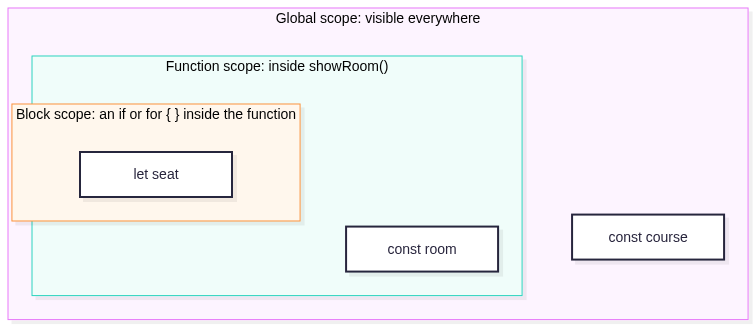
Why does this matter? Here's the classic case, a loop that schedules three small tasks:
for (var i = 0; i < 3; i++) {
  setTimeout(() => console.log("var:", i), 0);
}
for (let j = 0; j < 3; j++) {
  setTimeout(() => console.log("let:", j), 0);
}
var: 3
var: 3
var: 3
let: 0
let: 1
let: 2
With var, there's only one i, shared by the whole loop. By the time the tasks run, the loop has finished and i is 3, so all three print 3. With let, each pass of the loop gets its own j, so the tasks print 0, 1 and 2. This is one of the problems let fixes. (Why the tasks run after the loop is explained in synchronous vs asynchronous JavaScript.)
var vs let vs const
var |
let |
const |
|
|---|---|---|---|
| Can be reassigned | Yes | Yes | No (TypeError) |
| Same name declared twice | Allowed, silently | SyntaxError |
SyntaxError |
| Must get a value when declared | No | No | Yes (SyntaxError without one) |
| Scope | Function | Block { } |
Block { } |
| Use it for | Old code you're reading | Values that change: counters, totals | Everything else |
A common rule: use const by default, switch to let when the value really needs to change, and leave var for old code. Reading const tells you "this won't change", which makes code easier to follow.
Try it: the assignment
Declare a student's name, age and student status, print them, then try changing each:
let studentName = "Asha";
let age = 20;
const isStudent = true;
console.log(studentName, age, isStudent);

// let values can change
studentName = "Asha K.";
age = 21;
console.log(studentName, age, isStudent);

// const values cannot
isStudent = false;
Asha 20 true
Asha K. 21 true
isStudent = false;
          ^
TypeError: Assignment to constant variable.
The let variables took their new values. The const one refused, and the program stopped at that line with the same TypeError as before.
The takeaway: a variable is a labelled box for a value; const boxes can't be refilled, let boxes can, and both stay inside their { } block, while var leaks out and allows duplicates. The values inside are strings, numbers, booleans, undefined or null, and typeof tells you which (except for null's famous quirk). This post skipped hoisting, which explains some of var's other odd behaviour; it builds on the scope rules here.
Before you run it: what do you think typeof undefined prints, and is it the same answer as for typeof null?
Comments
Join the discussionNo comments yet. Be the first to comment.




