person.key vs person[key]: JavaScript Objects for Beginners
What objects are, creating them, dot vs bracket notation, updating, adding and deleting properties, and looping through keys, with real output
Here's a person stored as an array:
const person = ["Asha", 24, "Pune"];
console.log(person[1]); // 24
person[1] is 24. But 24 what? Age? House number? Years at the company? The array knows the order, not the meaning. You have to remember that position 1 is the age, and so does everyone who reads your code.
Here's the same person as an object:
const person = { name: "Asha", age: 24, city: "Pune" };
console.log(person.age); // 24
Every value has a name. person.age says what it is. That's the whole idea of objects, and this post covers how to create them, read and change them, add and remove properties, and loop through them. Every output is real, from Node.js 24.22.
What objects are and why we need them
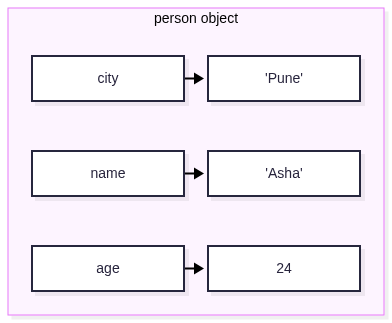
An object is a collection of key-value pairs. Each key is a name (a string), and each value is the data stored under that name. Together, a key and its value are called a property.
const person = { name: "Asha", age: 24, city: "Pune" };
name, age and city are the keys; "Asha", 24 and "Pune" are the values. Think of a form with labelled fields: the label is the key, and what's written next to it is the value.
You need objects whenever data has parts with meanings: a user, a product, a setting, an order. Arrays are for lists of similar things; objects are for one thing described by several named facts.
Creating objects
The usual way is an object literal: curly braces, with key: value pairs separated by commas.
const person = { name: "Asha", age: 24, city: "Pune" };
Values can be anything: strings, numbers, booleans, arrays, even other objects:
const user = {
  name: "Asha",
  skills: ["js", "css"],
  address: { city: "Pune", pin: "411001" },
  active: true,
};

user.skills[0];     // "js"
user.address.city;  // "Pune"
You can also start with an empty object and add properties as you go:
const student = {};
student.name = "Ravi";
student.course = "JS";
console.log(student); // { name: 'Ravi', course: 'JS' }
Accessing properties: dot vs bracket notation
There are two ways to read a property:
person.age;       // 24      ← dot notation
person["city"];   // "Pune"  ← bracket notation, key as a string
Dot notation is shorter, and it's what you'll use most. Bracket notation is needed in two situations.
1. The key isn't a valid name. Keys with spaces or dashes can't follow a dot:
const profile = { "favourite color": "teal", "home-town": "Surat" };
profile["favourite color"]; // "teal"
2. The key is stored in a variable. This is the one that catches beginners:
const key = "city";
console.log(person.key);  // undefined
console.log(person[key]); // Pune
person.key doesn't read the variable key. It looks for a property literally named "key", which doesn't exist, so you get undefined. person[key] evaluates key first, gets "city", and reads person.city. Rule of thumb: dot for names you type, brackets for names you compute.
Missing properties
Reading a property that doesn't exist isn't an error. You just get undefined:
person.email; // undefined
But going one level deeper is an error, because you're now asking undefined for a property:
person.address.pin;
TypeError: Cannot read properties of undefined (reading 'pin')
That's one of the most common runtime errors in JavaScript, and I covered handling it in try/catch/finally in JavaScript.
Updating properties
Assign a new value to an existing key:
person.age = 25;
console.log(person); // { name: 'Asha', age: 25, city: 'Pune' }
person was declared with const, and the update still worked. const stops you from replacing the whole object, not from changing what's inside it:
person = {};
TypeError: Assignment to constant variable.
Adding and deleting properties
Adding a property uses exactly the same syntax as updating one. If the key doesn't exist yet, it's created:
person.email = "asha@example.com";
// { name: 'Asha', age: 25, city: 'Pune', email: 'asha@example.com' }
To remove one, use delete:
delete person.email; // true
// { name: 'Asha', age: 25, city: 'Pune' }
Deleting a property isn't the same as setting it to undefined. Here are two identical objects, one of each:
const a = { name: "Asha", city: "Pune" };
const b = { name: "Asha", city: "Pune" };
a.city = undefined;
delete b.city;
a:                      { name: 'Asha', city: undefined }
b:                      { name: 'Asha' }
"city" in a / in b:     true false
Object.keys(a) / (b):   [ 'name', 'city' ] [ 'name' ]
a still has a city key, just with no value; b doesn't have one at all. The difference shows up when you loop over keys, count them, or send the object as JSON. Use delete when the property should really be gone.
Looping through object keys
for...in visits each key of an object:
for (const key in person) {
  console.log(key, "->", person[key]);
}
name -> Asha
age -> 25
city -> Pune
Note the brackets: person[key], because key is a variable. That's the dot-vs-bracket rule in action.
The other common way is to turn the object into an array first, then loop with for...of:
Object.keys(person);    // [ 'name', 'age', 'city' ]
Object.values(person);  // [ 'Asha', 25, 'Pune' ]
Object.entries(person); // [ [ 'name', 'Asha' ], [ 'age', 25 ], [ 'city', 'Pune' ] ]

for (const [key, value] of Object.entries(person)) {
  console.log(`${key}: ${value}`);
}
name: Asha
age: 25
city: Pune
Object.entries gives each key with its value, which is usually what you want. Keys come back in the order they were added, with one exception: number-like keys are moved to the front and sorted, which I showed in Map and Set explained.
Arrays vs objects
Both store several values in one variable. The difference is how you find each value:
| Array | Object | |
|---|---|---|
| Values found by | Position (index: 0, 1, 2…) | Name (key: name, age…) |
| Written as | ["Asha", 24, "Pune"] |
{ name: "Asha", age: 24, city: "Pune" } |
| Order | The order is the point | Not what you rely on |
| Size | arr.length |
Object.keys(obj).length |
| Best for | Lists of similar things: marks, tasks, fruits | One thing with named facts: a user, a product, a setting |
One confusing detail: arrays are a special kind of object, so typeof can't tell them apart:
typeof []:                   object
typeof {}:                   object
Array.isArray([]) / ({}):    true false
Use Array.isArray when you need to know which one you have. (Arrays have their own post: JavaScript Arrays 101.)

Try it: the assignment
The brief's four steps in one script:
// 1. An object representing a student
const student = {
  name: "Asha",
  age: 20,
  course: "Web Dev Cohort 2026",
};

// 2. Add a property
student.city = "Pune";

// 3. Update one property
student.age = 21;

// 4. Print all keys and values with a loop
for (const key in student) {
  console.log(`${key}: ${student[key]}`);
}
name: Asha
age: 21
course: Web Dev Cohort 2026
city: Pune
age shows the updated value, and city appears last because it was added last.
The takeaway: an object stores values by name instead of position. Use dot notation for keys you type and brackets for keys in a variable; assign to add or update, delete to remove, and for...in or Object.entries to loop. This post skipped prototypes and methods on purpose. The natural next step is pulling values out in one line with destructuring.
Without running it: if const key = "age", what do person.key and person[key] each return, and why are they different?
Comments
Join the discussionNo comments yet. Be the first to comment.




