Don't Serve uploads/ Blindly: Safe File Serving in Express
Folder-based storage, local disk vs object storage, express.static, URL access, controlled downloads, and upload security in Express 5.3.0

Many Express tutorials finish a file-upload feature with one line:
// ❌ exposes everything in the folder — including private files or stray HTML
app.use(express.static("uploads"));
That single line works until a user uploads a private invoice next to public avatars, or a stray .env or .html file ends up in the served directory. Storing uploaded files and serving them safely are two separate decisions: public assets can be served via express.static with strict options, while private files belong behind an authenticated route using res.download.
Every response and header below comes from a real run on Node.js 24.22.1 and Express 5.3.0.
Where uploaded files should live: folder-based structure
Keep uploaded files outside your source folder (src/), split public files from private ones, and add uploads/ to .gitignore so user files never enter Git history:
my-app/
├── src/
│   └── server.js
├── uploads/
│   ├── public/
│   │   └── avatars/
│   │       └── u42.png
│   └── private/
│       └── invoice-101.txt
└── .gitignore   # includes uploads/
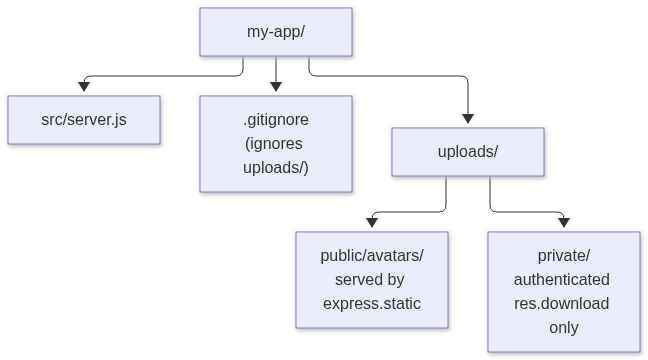
Three habits keep this structure maintainable:
- Store only the relative key in your database (such as
avatars/u42.png), not a full disk path likeC:\app\uploads\...orhttp://localhost:3000/.... Moving to a new server or cloud bucket later requires changing one prefix instead of rewriting database rows. - Never expose
uploads/private/withexpress.static. Onlyuploads/public/should ever be mapped to a public URL prefix. - Create the folders on startup. Because
uploads/is in.gitignore, a freshgit clonewill not contain those folders. Runfs.mkdirSync(publicDir, { recursive: true })andfs.mkdirSync(privateDir, { recursive: true })when your server boots so the first upload never crashes withENOENT.
Local storage vs external object storage
Local disk storage is ideal while learning and for small single-server apps, but it has real limits in production. Compare the two before deciding where uploads live:
| Factor | Local disk (uploads/) |
External object storage (S3, GCS, R2) |
|---|---|---|
| Setup effort | Zero extra services; create a folder | Requires bucket, IAM keys, and SDK |
| Survives redeploys | No on ephemeral containers / PaaS | Yes (independent of app servers) |
| Multiple app servers | Breaks (files on Server A 404 on Server B) | Works across any number of servers |
| CDN & bandwidth | Express serves every byte itself | Offloaded to CDN / object storage |
| Best fit | Local dev, single-VM internal tools | Production web apps at scale |
Start on local disk with clean relative paths (avatars/u42.png) so switching to external object storage later does not require redesigning your database schema.
How static file serving works in Express
Static file serving means mapping a URL path straight to a directory on disk without writing a separate app.get() route for every file. Express ships express.static(rootDir, options) for this job.
When a client requests GET /files/avatars/u42.png, Express strips the /files mount prefix, looks up avatars/u42.png inside uploads/public/, sets Content-Type from the file extension, and streams the bytes back. If no matching file exists, it calls next() so your normal routes or 404 handler can respond.
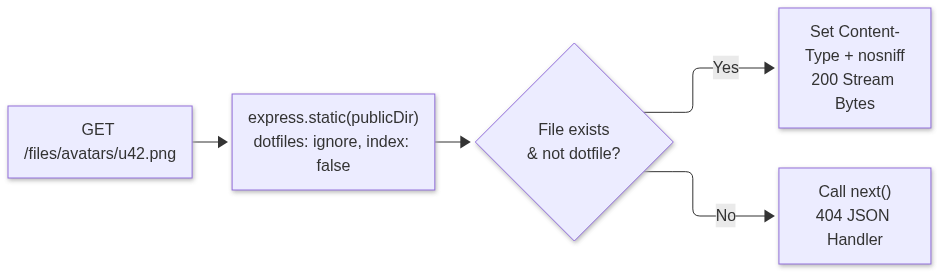
Mount express.static on a dedicated prefix (/files, not /) and pass three protective options:
// src/server.js (Node.js 24.22.1, Express 5.3.0)
const path = require("path");
const express = require("express");

const app = express();
const publicDir = path.join(__dirname, "..", "uploads", "public");
const privateDir = path.join(__dirname, "..", "uploads", "private");

app.use(
  "/files",
  express.static(publicDir, {
    dotfiles: "ignore", // treat hidden files like .env as 404
    index: false,       // do not auto-serve index.html from upload folders
    setHeaders: (res) => {
      res.setHeader("X-Content-Type-Options", "nosniff");
    },
  })
);
dotfiles: "ignore"prevents hidden files (like.envor.htaccess) from being served even if one accidentally lands in the folder.index: falsestops Express from automatically rendering anindex.htmlif someone requests a directory URL.X-Content-Type-Options: nosnifftells browsers not to guess a different MIME type (for example, executing a mislabelled file as HTML or JavaScript).- Optional caching (
maxAge): when your upload filenames include a unique UUID (so files are never overwritten in place), passingmaxAge: "1d"toexpress.staticlets browsers reuse cached avatars instead of downloading them on every page load.
Accessing uploaded files via URL (real Express 5.3.0 output)
With u42.png inside uploads/public/avatars/ and a decoy .env file inside uploads/public/, three real requests returned:
GET /files/avatars/u42.png -> 200 | type=image/png | nosniff=nosniff | body=fake-png-bytes
GET /files/.env -> 404 | type=application/json | body={"error":"Not found"}
GET /files/avatars/missing.png -> 404 | type=application/json | body={"error":"Not found"}
The avatar streamed back with image/png and nosniff, while both .env and the missing file fell through cleanly to our JSON 404 handler.
Controlled downloads for private files
For private files (invoices, resumes, user exports), do not use express.static. Put them behind a route where you can check authentication first, validate the filename against path traversal (../), and send the file with res.download and { root: privateDir }:
// Add authentication middleware before this handler in real apps
app.get("/download/:name", (req, res) => {
  const safeName = path.basename(req.params.name);
  if (safeName !== req.params.name || !/^[a-zA-Z0-9._-]+$/.test(safeName)) {
    return res.status(400).json({ error: "Invalid filename" });
  }

  const fullPath = path.resolve(privateDir, safeName);
  if (!fullPath.startsWith(privateDir + path.sep)) {
    return res.status(400).json({ error: "Invalid path" });
  }

  res.setHeader("X-Content-Type-Options", "nosniff");
  res.download(safeName, safeName, { root: privateDir }, (err) => {
    if (err && !res.headersSent) {
      res.status(err.statusCode || 404).json({ error: "File not found" });
    }
  });
});

app.use((req, res) => res.status(404).json({ error: "Not found" }));
app.listen(3000, () => console.log("Listening on http://127.0.0.1:3000"));
To reproduce the responses in this post, run node setup.js once to create the sample files, start the server with node src/server.js, then run node client.js in a second terminal. The "PNG" is only the text fake-png-bytes, which is enough to show the headers:
// setup.js: creates the sample files used in the examples (run once from my-app/)
const fs = require("fs");

fs.mkdirSync("uploads/public/avatars", { recursive: true });
fs.mkdirSync("uploads/private", { recursive: true });
fs.writeFileSync("uploads/public/avatars/u42.png", "fake-png-bytes"); // not a real PNG, just bytes
fs.writeFileSync("uploads/public/.env", "SECRET=1");                  // decoy dotfile
fs.writeFileSync("uploads/private/invoice-101.txt", "Invoice #101: Paid");
// client.js: run while src/server.js is listening
const base = "http://127.0.0.1:3000";

async function show(path) {
  const res = await fetch(base + path);
  const parts = [`GET ${path} -> ${res.status}`, `type=${(res.headers.get("content-type") || "").split(";")[0]}`];
  const nosniff = res.headers.get("x-content-type-options");
  if (nosniff) parts.push(`nosniff=${nosniff}`);
  const disp = res.headers.get("content-disposition");
  if (disp) parts.push(`disp=${disp}`);
  parts.push(`body=${await res.text()}`);
  console.log(parts.join(" | "));
}

(async () => {
  await show("/files/avatars/u42.png");
  await show("/files/.env");
  await show("/files/avatars/missing.png");
  await show("/download/invoice-101.txt");
  await show("/download/..%2Fsecret.txt");
})();
Real responses for a valid private file and a ../ path-traversal attempt:
GET /download/invoice-101.txt -> 200 | type=text/plain | nosniff=nosniff | disp=attachment; filename=invoice-101.txt | body=Invoice #101: Paid
GET /download/..%2Fsecret.txt -> 400 | type=application/json | body={"error":"Invalid filename"}
Passing { root: privateDir } to res.download does two things: it confines file resolution inside privateDir, and it avoids a subtle Express 5 send trap where an absolute path containing a dot-prefixed ancestor directory (such as a .config or .cache parent folder) gets rejected as a dotfile.
Security considerations for serving uploads
Before exposing uploaded files over HTTP, verify five rules:
- Separate public and private folders. Only mount
express.staticon the public directory. - Send
X-Content-Type-Options: nosniffon every served upload so browsers obey your declaredContent-Type. - Never serve user-uploaded
.html,.js, or.svgfiles inline from your app's primary domain — SVG files can embed<script>tags and trigger stored XSS. Force downloads withContent-Disposition: attachmentor serve user content from a separate sandbox domain. - Block path traversal on dynamic file routes. Combine
path.basename, a strict character allowlist, and{ root: privateDir }so..%2Fcannot escape the upload folder. - Check authorization on private routes. Never rely on "hard-to-guess filenames" as access control for sensitive documents.
When NOT to serve uploaded files through Express
Express is fine for local development and modest traffic, but Node.js should not spend CPU and bandwidth streaming large videos, high-traffic image galleries, or gigabyte backups on every request. Once traffic grows, put a reverse proxy (Nginx) or a CDN in front of your files, or serve them directly from object storage (S3, GCS, R2) using public CDN URLs or short-lived pre-signed URLs.
Where this leaves you
Keep uploads outside src/, split uploads/public/ from uploads/private/, serve public assets with express.static (dotfiles: "ignore", index: false, nosniff), and guard private files behind authenticated res.download routes with strict filename validation.
One honest limit: this walkthrough stays on local disk without an authentication middleware wired into /download/:name and without cloud pre-signed URLs or full CDN cache-invalidation strategies. Have you ever had express.static accidentally expose files you didn't intend to make public?
Comments
Join the discussionNo comments yet. Be the first to comment.



