/users/42 vs /users?id=42: Params vs Query in Express.js
Identifiers vs filters, req.params vs req.query, string types, repeated keys, and combining both in Express 5.3.0

Both /users/42 and /users?id=42 pass the number 42 to an Express server, and both hand it to your code as the string "42":
params: [Object: null prototype] { id: '42' } typeof id: string === 42: false
Yet they are not interchangeable. Drop 42 from /users/42 and Express returns 404 Not Found because the route no longer matches. Drop id=42 from /users?id=42 and the request still enters your /users handler with req.query.id set to undefined.
That single difference explains the whole rule behind URL parameters vs query strings: URL parameters identify a required resource; query strings filter or modify a response optionally. Every output below comes from a real run on Node.js 24.22.1 and Express 5.3.0.
URL structure breakdown
A single URL can carry both a URL parameter and query parameters at the same time:
https://api.example.com/users/42/orders?status=shipped&limit=1
                              ^^       ^^^^^^^^^^^^^^^^^^^^^^^
                              |        |
                              |        query string: status=shipped, limit=1
                              URL parameter (:id)
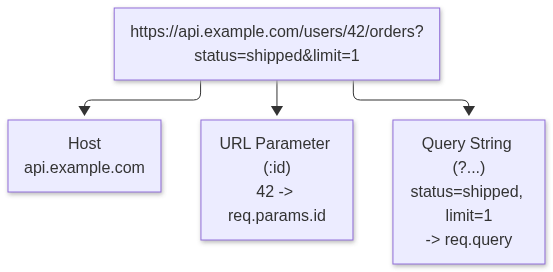
- Everything before
?is the path. Dynamic segments inside the path (defined with a colon like:idin Express) are URL parameters (also called route or path parameters). - Everything after
?is the query string —key=valuepairs joined by&.
URL parameters: identifying a specific resource (req.params)
Use URL parameters when a value is required to identify which resource the client is asking for — such as a user profile ID (/users/42), a blog post slug (/posts/intro), or an order number (/orders/101).
In Express, prefix a path segment with : and read it from req.params:
// server.js (Node.js 24.22.1, Express 5.3.0)
const express = require("express");
const app = express();

const users = [
  { id: 42, name: "Asha", role: "admin" },
  { id: 43, name: "Ravi", role: "member" },
];

app.get("/users/:id", (req, res) => {
  console.log("params:", req.params, "typeof id:", typeof req.params.id, "=== 42:", req.params.id === 42);
  const id = Number(req.params.id); // req.params.id is always a string
  const user = users.find((u) => u.id === id);
  if (!user) return res.status(404).json({ error: "User not found" });
  res.status(200).json(user);
});
Real responses from Node.js 24.22.1 and Express 5.3.0:
GET /users/42 -> 200 {"id":42,"name":"Asha","role":"admin"}
GET /users -> 404 {"error":"Route GET /users not found"}
Three details to watch:
- Order matters. In
/users/:userId/orders/:orderId, the positions are fixed (req.paramsbecomes{ userId: "42", orderId: "101" }); swapping them points to a completely different resource. - Always convert numeric IDs. Because
req.params.idis"42",u.id === req.params.idevaluates tofalsewhenu.idis the number42. Convert withNumber(...)(and checkNumber.isInteger(id)if you want to reject/users/abcwith400). - URL encoding is decoded automatically. If a slug or name contains a space (
%20), Express decodes it before putting it onreq.params. Also notice[Object: null prototype]in the opening log: Express 5 createsreq.paramswithoutObject.prototypeso a route parameter namedtoStringorconstructorcannot collide with inherited object methods.
Query strings: filtering and modifying results (req.query)
Use query strings for optional modifiers — search terms, category filters, price ceilings, sorting (?sort=asc), and pagination (?page=2&limit=20). Removing a query parameter should still leave a valid URL that returns sensible defaults.
Express parses the query string automatically onto req.query — you do not declare query keys in the route path:
const products = [
  { id: 1, title: "JS Guide", category: "books", price: 350 },
  { id: 2, title: "Node Deep Dive", category: "books", price: 650 },
  { id: 3, title: "USB-C Hub", category: "hardware", price: 450 },
];

app.get("/products", (req, res) => {
  const { category, maxPrice } = req.query;
  let result = products;

  if (category) {
    result = result.filter((p) => p.category === String(category));
  }
  if (maxPrice !== undefined) {
    const limit = Number(maxPrice);
    if (!Number.isNaN(limit)) {
      result = result.filter((p) => p.price <= limit);
    }
  }

  res.status(200).json({ query: req.query, count: result.length, items: result });
});
Real responses with no query, with filters, and with a repeated key:
GET /products -> 200 {"query":{},"count":3,"items":[...]}
GET /products?category=books&maxPrice=500 -> 200 {"query":{"category":"books","maxPrice":"500"},"count":1,"items":[{"id":1,"title":"JS Guide","category":"books","price":350}]}
GET /products?tag=js&tag=node -> 200 {"query":{"tag":["js","node"]},"count":3,"items":[...]}
Look closely at that third line: ?tag=js&tag=node turned req.query.tag into an array ["js", "node"]. Calling req.query.tag.toLowerCase() without checking typeof req.query.tag === "string" will throw a TypeError if any caller repeats a query key. Wrapping with String(...) or checking typeof prevents that crash.
Three other query-string habits save bugs early:
- Never use
Boolean(req.query.inStock)for flags. Because every non-empty string is truthy in JavaScript,Boolean("false")evaluates totrue. Compare explicitly:req.query.inStock === "true". - Always clamp pagination defaults. Write
const page = Math.max(1, Number(req.query.page) || 1)so?page=-5or?page=abcfalls back safely to page1. - Build query strings with
URLSearchParamson the client. Rather than concatenating?q=${input}by hand (which breaks if the user types&or#), pass an object tonew URLSearchParams({ category: "books", maxPrice: "500" }).toString()so special characters are encoded safely every time.
Key differences at a glance
| Feature | URL Parameters (req.params) |
Query Strings (req.query) |
|---|---|---|
| URL syntax | /users/42 |
/products?category=books&maxPrice=500 |
| Route definition | Declared with : (/users/:id) |
Not declared in the path (/products) |
| Required or optional | Required to match the route | Optional (defaults to undefined) |
| Parameter order | Fixed by path position | Any order (?a=1&b=2 equals ?b=2&a=1) |
| Repeated keys | Not applicable | Becomes an array (["js", "node"]) |
| Primary role | Identify a specific resource | Filter, search, sort, or paginate |
Combining both in one route
Real APIs use req.params and req.query together all the time: the URL parameter identifies whose collection you want, and the query string filters which items from that collection come back.
const orders = [
  { id: 101, userId: 42, status: "shipped" },
  { id: 102, userId: 42, status: "pending" },
  { id: 103, userId: 42, status: "shipped" },
];

app.get("/users/:id/orders", (req, res) => {
  const userId = Number(req.params.id);
  const { status, limit } = req.query;

  let result = orders.filter((o) => o.userId === userId);
  if (status) result = result.filter((o) => o.status === String(status));
  if (limit) result = result.slice(0, Number(limit));

  res.status(200).json({ userId, filters: req.query, orders: result });
});

// Catch-all 404 at the bottom: unknown routes get JSON instead of Express's default HTML page
app.use((req, res) => {
  res.status(404).json({ error: `Route ${req.method} ${req.url} not found` });
});

app.listen(3000, () => console.log("Listening on http://127.0.0.1:3000"));
Every response in this post came from this small client (Node's built-in fetch). Run node server.js in one terminal and node client.js in another:
// client.js: run while server.js is listening (long items arrays are trimmed to [...] in this post)
const base = "http://127.0.0.1:3000";
const paths = [
  "/users/42",
  "/users",
  "/products",
  "/products?category=books&maxPrice=500",
  "/products?tag=js&tag=node",
  "/users/42/orders?status=shipped&limit=1",
];

(async () => {
  for (const path of paths) {
    const res = await fetch(base + path);
    console.log(`GET ${path} -> ${res.status} ${await res.text()}`);
  }
})();
GET /users/42/orders?status=shipped&limit=1 -> 200 {"userId":42,"filters":{"status":"shipped","limit":"1"},"orders":[{"id":101,"userId":42,"status":"shipped"}]}
Notice how natural that URL reads: "user 42's orders, filtered to shipped, limited to 1."
When to use params vs query strings
Ask one question: does removing this value change which resource the URL points to, or only how the response is filtered/sorted?
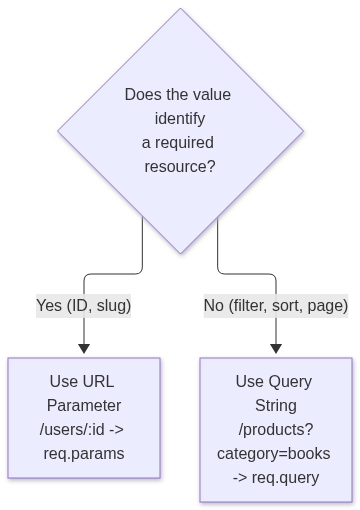
- Use
req.paramsfor unique IDs, slugs, and hierarchical ownership (/users/42,/posts/express-routing,/users/42/orders). - Use
req.queryfor optional filters, search keywords, sorting, pagination, and field selection (/products?q=node&sort=price&page=2).
A quick smell test on real URLs:
GET /users/42beatsGET /users?id=42because42identifies one specific user profile.GET /products?category=books&sort=pricebeatsGET /products/books/pricebecause bothcategoryandsortare optional modifiers — putting them in the path forces callers to pass placeholder segments whenever they want to omit one.
When NOT to put data in either one
Never put secrets (passwords, API keys, JWTs, reset tokens) or large payloads in URL parameters or query strings:
- Full URLs — including query strings — are recorded in web server access logs, proxy logs, browser history, and
Refererheaders. Avoid putting personal data like email addresses or phone numbers in URLs too, and send tokens in theAuthorizationheader and credentials in aPOSTJSON body over HTTPS. - Browsers and proxies cap URL length (often a few kilobytes), so large search criteria or file payloads belong in a
POSTrequest body instead.
Where this leaves you
Use req.params for required resource identifiers in the path (/users/:id), use req.query for optional filters and modifiers (/products?category=books), convert numeric strings before comparing, and guard against repeated query keys turning into arrays.
One honest limit: this post uses Express 5.3.0's default query parser (simple) and does not cover switching app.set("query parser", "extended") for nested objects like ?filter[min]=10 or validating inputs with a schema library like Zod. Have you ever been bitten by a repeated query parameter turning a string into an array in Express?
Comments
Join the discussionNo comments yet. Be the first to comment.



