Stop Writing user.name Five Times: JavaScript Destructuring Explained
Array and object destructuring, renaming, default values and the errors to recognise, with before-and-after examples and real output

Here's a function that describes a user:
function describe(user) {
  return `${user.name} (${user.age}) lives in ${user.city}. ${user.name} is ${user.age >= 18 ? "an adult" : "a minor"}.`;
}
user. appears five times. Here's the same function with destructuring:
function describe({ name, age, city }) {
  return `${name} (${age}) lives in ${city}. ${name} is ${age >= 18 ? "an adult" : "a minor"}.`;
}
Both print exactly the same thing:
Asha (24) lives in Pune. Asha is an adult.
The second version says up front which three properties it uses, and drops the repetition. That's destructuring. This post covers arrays, objects and default values, plus the few spots where it surprises people. Every output is real, from Node.js 24.22.
What destructuring means
Destructuring unpacks values from an array or an object into separate variables, in one statement. It's shorthand for reading values one by one:
// Without destructuring
const name = user.name;
const city = user.city;

// With destructuring: the same two lines
const { name, city } = user;
It only reads. The original array or object isn't changed.
Destructuring arrays
Array destructuring works by position. Square brackets on the left, and each variable takes the value at its spot:
const colors = ["red", "green", "blue", "yellow"];

const [first, second] = colors;   // "red", "green"
const [, , third] = colors;       // "blue": commas skip positions
const [head, ...others] = colors; // "red", ["green", "blue", "yellow"]
...others (the rest element) collects everything that's left into a new array.
One neat trick: swapping two variables without a temporary one.
let a = 1, b = 2;
[a, b] = [b, a];
console.log(a, b); // 2 1
You've probably already used array destructuring without noticing. In React, const [count, setCount] = useState(0) is exactly this: useState returns a two-item array, and you name both items.
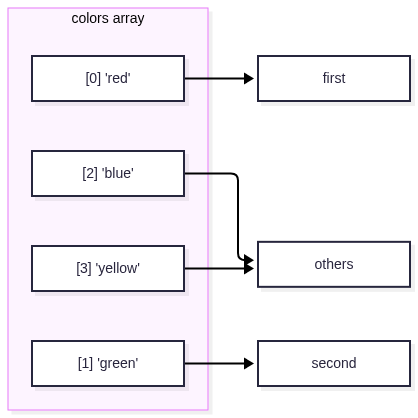
...others collects whatever is left.
Destructuring objects
Object destructuring works by name. Curly braces on the left, and each variable takes the property with the same name. Order doesn't matter:
const user = { name: "Asha", city: "Pune", age: 24 };
const { city, name } = user; // "Pune", "Asha"
Renaming
To use a different variable name, write property: newName:
const { name: userName } = user;
console.log(userName); // Asha
console.log(name);     // ReferenceError: name is not defined
This reads backwards from what most people expect. { name: userName } doesn't create a variable called name. It takes the name property and stores it in a variable called userName. Read the colon as "into": name into userName.
Nested objects and rest
You can reach into nested objects by repeating the pattern:
const user = { name: "Asha", address: { pin: "411001", area: "Kothrud" } };
const { address: { pin } } = user;
console.log(pin); // 411001
Only pin becomes a variable here; address is just the path to it (using address afterwards is a ReferenceError). And ...rest works for objects too, collecting the remaining properties into a new object:
const { age, ...rest } = { name: "Asha", city: "Pune", age: 24 };
// age = 24, rest = { name: "Asha", city: "Pune" }
In function parameters
This is where you'll see object destructuring most: unpacking an object right in the parameter list, as in the opening example. It's especially common for "options" objects, and for props in React components.
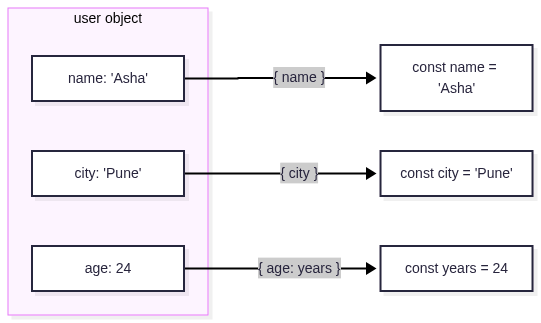
age goes into years.
Default values
You can give any destructured variable a fallback with =:
const settings = { fontSize: 16, theme: undefined, lang: null };
const { theme = "light", lang = "en", fontSize = 14, mode = "auto" } = settings;
{ theme: 'light', lang: null, fontSize: 16, mode: 'auto' }
Look at each one:
modeis missing, so the default"auto"is used.themeisundefined, so the default"light"is used.fontSizeis16, so the real value wins over the default.langisnull, and it staysnull. The default"en"is not used.
Defaults only apply when the value is undefined or missing. null counts as a real value. If an API sends null for "no value", a destructuring default won't catch it; use ?? for that instead.
The error to recognise
Destructuring needs something to read from. Destructure undefined or null and it throws:
function greet({ name, city = "somewhere" }) {
  return `${name} from ${city}`;
}
greet();
TypeError: Cannot destructure property 'name' of 'undefined' as it is undefined.
greet() passed nothing, so the parameter is undefined, and there's no name to read. The fix is a default for the whole object, = {}:
function greetSafe({ name = "Guest", city = "somewhere" } = {}) {
  return `${name} from ${city}`;
}
greetSafe(); // "Guest from somewhere"
You'll see the same TypeError with "of 'null'" (const { x } = null gave Cannot destructure property 'x' of 'null' as it is null.). It typically shows up when data you expected hasn't arrived yet.
Before vs after
Reading an API response:
// Before
const title = response.data.title;
const author = response.data.author;
const views = response.data.views;

// After
const { title, author, views } = response.data;
Function options:
// Before
function createButton(options) {
  const label = options.label || "OK";
  const size = options.size || "medium";
}

// After
function createButton({ label = "OK", size = "medium" } = {}) {}
The "after" version also states the function's options right in its signature, so anyone calling it can see what it takes. One difference to be aware of: || also replaces "" and null, while the destructuring defaults only replace missing or undefined values, as covered above.
Functions that return two values:
// Before
const result = getMinMax(scores);
const min = result[0];
const max = result[1];

// After
const [min, max] = getMinMax(scores);
Benefits, and when not to
- Less repetition.
user.written once instead of five times. - Clearer signatures.
function describe({ name, age, city })documents what it needs. - Defaults in one place, next to the values they protect.
- Better names. Rename awkward property names (
{ usr_nm: userName }) at the point you read them.
Don't overdo it, though. A pattern three levels deep, like const { a: { b: { c } } } = data, is harder to read than data.a.b.c, and it throws if any level is missing. And if you use a value exactly once, user.name right where you need it is perfectly clear.
The takeaway: destructuring unpacks arrays by position and objects by name into variables, in one line. Defaults cover undefined, not null, and a = {} default stops the "cannot destructure" error. This post skipped destructuring in loops (for (const [key, value] of map)), which uses exactly the same patterns.
Find a function in your code that writes props. or options. more than three times. What would its signature look like destructured?
Comments
Join the discussionNo comments yet. Be the first to comment.




