try/catch/finally in JavaScript: Fail Gracefully Instead of Crashing
What errors are, how try, catch and finally work, throwing your own errors, and the empty catch that hides bugs, with real output
Here's a three-line script. The second line reads a property from something that isn't there:
const user = undefined;
console.log("1. loading profile");
console.log("2. name:", user.name);
console.log("3. this line never runs");
1. loading profile
console.log("2. name:", user.name);
                             ^
TypeError: Cannot read properties of undefined (reading 'name')
Line 1 printed. Line 2 threw an error. Line 3 never ran, and the program stopped with exit code 1. One missing value, and everything after it is gone.
Now the same code with the risky line wrapped in try and catch:
const user = undefined;
console.log("1. loading profile");
try {
  console.log("2. name:", user.name);
} catch (err) {
  console.log("2. could not read the name:", err.message);
}
console.log("3. the program kept going");
1. loading profile
2. could not read the name: Cannot read properties of undefined (reading 'name')
3. the program kept going
Same error, but the program failed gracefully: it noticed, said what went wrong, and carried on. That's what error handling is for. This post covers what errors are, try/catch/finally, throwing your own errors, and the mistakes that make error handling hide bugs instead of exposing them. Every output is real, from Node.js 24.22 (file paths trimmed from stack traces).
What errors are in JavaScript
When something goes wrong while code is running, JavaScript creates an error object and throws it. If nothing catches it, the program stops, as in the first example.
Every error object carries three useful things:
try { JSON.parse("{bad"); } catch (e) {
  console.log("name:", e.name);
  console.log("message:", e.message);
  console.log("stack, first line:", e.stack.split("\n")[0]);
}
name: SyntaxError
message: Expected property name or '}' in JSON at position 1 (line 1 column 2)
stack, first line: SyntaxError: Expected property name or '}' in JSON at position 1 (line 1 column 2)
name: the kind of error.message: what went wrong, in words.stack: where it happened, function by function, with file and line numbers (there's a full example further down). This is the part that makes debugging much faster.
The kinds you'll meet first, each triggered for real:
| Error | What triggered it | Message |
|---|---|---|
TypeError |
undefined.name |
Cannot read properties of undefined (reading 'name') |
ReferenceError |
using a misspelt variable, totl + 1 |
totl is not defined |
SyntaxError |
JSON.parse("not json") |
Unexpected token 'o', "not json" is not valid JSON |
RangeError |
(5).toFixed(200) |
toFixed() digits argument must be between 0 and 100 |
These are runtime errors: they happen while the code runs, often because of data you didn't expect. (A syntax mistake in your own code, like a missing bracket, is different: JavaScript refuses to run the file at all, so there's nothing to catch.)
try and catch
try marks a block of code that might throw. If it does, JavaScript jumps straight to catch, skipping the rest of the try block, and hands you the error object. If nothing throws, catch is skipped entirely. Either way, the code after it keeps running.
The everyday case is data you don't control. JSON.parse throws on anything that isn't valid JSON, like a settings file someone edited by hand:
function loadSettings(text) {
  try {
    return JSON.parse(text);
  } catch (err) {
    console.log("Bad settings, using defaults:", err.message);
    return { theme: "light" };
  }
}

console.log(loadSettings('{"theme":"dark"}'));
console.log(loadSettings("{theme: dark}"));
{ theme: 'dark' }
Bad settings, using defaults: Expected property name or '}' in JSON at position 1 (line 1 column 2)
{ theme: 'light' }
Good input works as normal. Bad input gets a clear message and a safe fallback, instead of a crash.

try/catch keeps running.
The finally block
finally is an optional third block that always runs: after try succeeds, after catch handles an error, and even when either of them has already returned:
function demo(shouldFail) {
  try {
    console.log(`  try (shouldFail=${shouldFail})`);
    if (shouldFail) throw new Error("boom");
    return "returned from try";
  } catch (err) {
    console.log("  catch:", err.message);
    return "returned from catch";
  } finally {
    console.log("  finally runs");
  }
}

console.log("result:", demo(false));
console.log("result:", demo(true));
  try (shouldFail=false)
  finally runs
result: returned from try
  try (shouldFail=true)
  catch: boom
  finally runs
result: returned from catch
Look at the first call: try hit return, and finally still ran before the value came back. That's what makes it the right place for cleanup that must happen no matter what, like hiding a loading spinner, closing a file or releasing a lock.
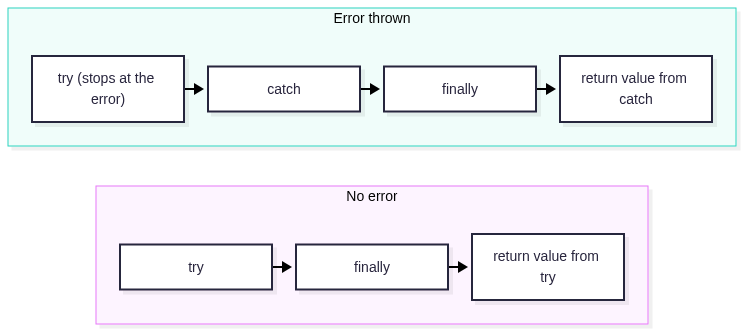
finally runs on both paths, even after a return.
Throwing custom errors
You can throw errors yourself with throw. This is how a function says "I can't do this with what you gave me". Always throw an Error object, not a plain string:
function withString() { throw "age must be a number"; }
function withError() { throw new Error("age must be a number"); }

try { withString(); } catch (e) {
  console.log("thrown string -> typeof:", typeof e, "| message:", e.message, "| stack:", e.stack);
}
try { withError(); } catch (e) {
  console.log("thrown Error  -> typeof:", typeof e, "| message:", e.message);
  console.log("stack:\n" + e.stack.split("\n").slice(0, 2).join("\n"));
}
thrown string -> typeof: string | message: undefined | stack: undefined
thrown Error  -> typeof: object | message: age must be a number
stack:
Error: age must be a number
    at withError (throwing.js:2:30)
JavaScript lets you throw a string, but it's just text: no message property, and no stack trace, so nothing tells you where it came from. The Error object points straight to withError, line 2.
For errors your code expects, like invalid form input, make your own error type by extending Error. (If classes are new to you, I covered them in One Blueprint, Many Objects.)
class ValidationError extends Error {
  constructor(field, message) {
    super(message);
    this.name = "ValidationError";
    this.field = field;
  }
}

function registerUser({ name, age }) {
  if (!name) throw new ValidationError("name", "Name is required");
  if (typeof age !== "number" || age < 0) throw new ValidationError("age", "Age must be a positive number");
  return `Registered ${name}, ${age}`;
}

for (const input of [{ name: "Asha", age: 20 }, { name: "", age: 20 }, { name: "Ravi", age: "twenty" }]) {
  try {
    console.log(registerUser(input));
  } catch (err) {
    if (err instanceof ValidationError) {
      console.log(`${err.name} on "${err.field}": ${err.message}`);
    } else {
      throw err; // not ours to handle
    }
  }
}
Registered Asha, 20
ValidationError on "name": Name is required
ValidationError on "age": Age must be a positive number
The instanceof check is the important part. This catch handles the errors it expects, validation problems, and rethrows anything else. A real bug elsewhere won't be mistaken for "the user typed something wrong".
What try/catch can't catch
try/catch only sees errors thrown while the try block is running. Code scheduled to run later isn't covered:
try {
  setTimeout(() => {
    throw new Error("thrown inside a timer");
  }, 10);
  console.log("try block finished; the timer hasn't fired yet");
} catch (err) {
  console.log("caught:", err.message); // never runs
}
try block finished; the timer hasn't fired yet
    throw new Error("thrown inside a timer");
    ^
Error: thrown inside a timer
By the time the timer fires, the try block finished long ago, so the error crashes the program. The fix is to handle errors where the async work happens: inside the callback, with .catch() on a promise, or with try/catch around an await, which I showed in async/await in JavaScript.
Why error handling matters, and how not to do it
Handled well, errors give you two things: graceful failure for users (a message and a fallback, not a blank screen) and information for you (a name, a message and a stack pointing to the line).
Handled badly, they take both away. Here's a cart total with a typo in the code, reduse instead of reduce, inside a try with an empty catch:
const cart = { items: [{ price: 499, qty: 2 }, { price: 150, qty: 1 }] };

// ❌ Empty catch: the typo is silently hidden
function totalSwallowed(cart) {
  try {
    return cart.items.reduse((sum, item) => sum + item.price * item.qty, 0);
  } catch {
    return 0;
  }
}
console.log("total with empty catch:", totalSwallowed(cart));

// Same typo, no catch: the error says exactly what's wrong
function total(cart) {
  return cart.items.reduse((sum, item) => sum + item.price * item.qty, 0);
}
try { total(cart); } catch (err) { console.log("without the catch:", `${err.name}: ${err.message}`); }

// ✅ Typo fixed
const fixed = (cart) => cart.items.reduce((sum, item) => sum + item.price * item.qty, 0);
console.log("after fixing the typo:", fixed(cart));
total with empty catch: 0
without the catch: TypeError: cart.items.reduse is not a function
after fixing the typo: 1148
With the empty catch, every cart totals 0. No error, no warning, just wrong numbers. Remove the catch, and JavaScript names the exact problem: reduse is not a function. Fix the typo and the real total, 1148, appears. The catch didn't handle the error; it hid a bug.
A few habits keep error handling honest:
- Catch only what you can actually handle, and rethrow the rest, like the
instanceofcheck above. - Don't leave a
catchempty. At minimum, logerrso the stack isn't lost. In the rare case where ignoring an error really is the plan, say so in a comment. - Keep
tryblocks small, around the one risky call, not a whole function. - Don't wrap everything. If you can check something first (
if (!user) return;), do that. Savetry/catchfor things you can't check in advance, like parsing input or calling a server.
The takeaway: an uncaught error stops your program; try/catch lets it fail gracefully, finally cleans up no matter what, and throw new Error() reports problems with a stack trace attached. Catch what you expect, rethrow what you don't, and don't leave a catch empty. This post stayed with the basics. Error handling for promises and async functions follows the same ideas, with .catch() and await.
Search your code for catch {} or catch (e) {} with nothing inside. What would have been printed there if it weren't empty?
Comments
Join the discussionNo comments yet. Be the first to comment.




