From .then() Chains to async/await: Same Promises, Cleaner Code
Why async/await exists, how async functions and await work, handling errors with try/catch, and running tasks in parallel, with real output
Here's one task with three dependent steps (get a user, then their orders, then the first order's details), written two ways. First as a promise chain, then with async and await. The three helpers at the top simulate slow requests with timers:
// Helpers that simulate slow requests
const wait = (ms, value) => new Promise((resolve) => setTimeout(() => resolve(value), ms));
const getUser = (id) => wait(50, { id, name: "Asha" });
const getOrders = (user) => wait(50, ["order-101", "order-102"]);
const getDetails = (orderId) =>
  orderId ? wait(50, { orderId, total: 499 }) : Promise.reject(new Error("no order id"));

// Promise chain
let user;
getUser(1)
  .then((u) => { user = u; return getOrders(u); })
  .then((orders) => getDetails(orders[0]))
  .then((details) => console.log("chain:      ", `${user.name}'s first order:`, details))
  .catch((err) => console.error("Something failed:", err.message));

// async/await
async function showFirstOrder() {
  try {
    const user = await getUser(1);
    const orders = await getOrders(user);
    const details = await getDetails(orders[0]);
    console.log("async/await:", `${user.name}'s first order:`, details);
  } catch (err) {
    console.error("Something failed:", err.message);
  }
}
showFirstOrder();
chain:       Asha's first order: { orderId: 'order-101', total: 499 }
async/await: Asha's first order: { orderId: 'order-101', total: 499 }
Identical output. The second version reads like ordinary top-to-bottom code. That's the whole pitch of async/await, and the rest of this post explains why it works, where it can trip you up, and how to run tasks at the same time. Every output is real, from Node.js 24.22.
Why async/await was introduced
Promises fixed the nesting problem of callbacks, but chains still have a rough edge: values from earlier steps aren't in scope later. In the chain above, user is needed in the last step, but it was created in the first one. The workaround is the let user; declared outside the chain, and longer chains tend to collect several of those.
async/await (added to JavaScript in ES2017) removes the workaround. Each result is a normal variable, in scope for the rest of the function. It's syntactic sugar: the same promises underneath, with a syntax that reads like synchronous code. You still need to understand promises, because everything below is built on them.
How async functions work
Put async in front of a function and two things change:
async function five() { return 5; }
console.log("five() returns:", five());
five() returns: Promise { 5 }
- It always returns a promise. You wrote
return 5, but the caller getsPromise { 5 }, a promise fulfilled with 5. To read the value, youawaitit or use.then. - Errors become rejections. If the function throws, the promise it returned is rejected, instead of the error being thrown at the caller:
async function boom() { throw new Error("went wrong"); }
boom().catch((e) => console.log("rejected with:", e.message));
rejected with: went wrong
The await keyword
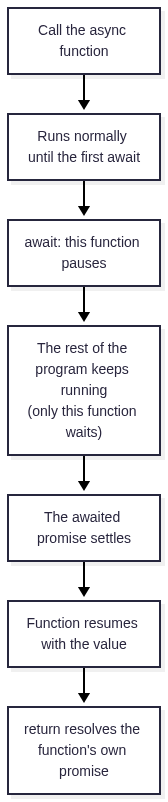
await goes in front of a promise. It pauses the async function until the promise settles, then gives you the value (or throws, if it was rejected):
// wait() is the helper from the first example
async function slowTask() {
  console.log("2. slowTask starts");
  await wait(100);
  console.log("4. slowTask resumes after await");
}

console.log("1. before calling slowTask");
slowTask();
console.log("3. after calling slowTask (program kept running)");
1. before calling slowTask
2. slowTask starts
3. after calling slowTask (program kept running)
4. slowTask resumes after await
Line 3 printed before line 4. await paused slowTask only, not the program. While slowTask waited, JavaScript carried on with the code after the call, then came back when the timer finished. That's why await doesn't freeze the page the way a busy loop would. It's the same waiting-in-the-background idea as in synchronous vs asynchronous JavaScript, with nicer syntax.
await only works inside an async function. Use it in a regular one and JavaScript refuses before running anything:
SyntaxError: await is only valid in async functions and the top level bodies of modules
That message hints at the exception: at the top level of an ES module, you can use await without a function around it. A file named .mjs with const x = await Promise.resolve(1) ran fine. In Node 24.22, a plain .js file with a top-level await and no package.json was treated as a module too, and also worked.
Error handling with try/catch
Because await throws when a promise is rejected, you handle failures with the ordinary try/catch you already know, plus finally for cleanup:
const failingRequest = () => wait(20).then(() => { throw new Error("server said 500"); });

async function withAwait() {
  try {
    const data = await failingRequest();
    console.log("never printed", data);
  } catch (err) {
    console.log("A. caught:", err.message);
  } finally {
    console.log("A. finally runs either way");
  }
}
A. caught: server said 500
A. finally runs either way
One try can cover several await lines, which is the same "one handler for the whole sequence" benefit that .catch gave a chain.
The trap: a forgotten await
Leave out the await, and catch can't help you:
async function forgotAwait() {
  try {
    const data = failingRequest();   // no await!
    console.log("B. no await, so try block 'succeeds':", data);
  } catch (err) {
    console.log("B. caught:", err.message);
  }
}
B. no await, so try block 'succeeds': Promise { <pending> }
B. unhandledRejection: server said 500
Without await, data is just the pending promise. The try block finishes normally, catch never runs, and the rejection arrives later with nobody handling it. (I added a process.on("unhandledRejection", …) hook to print that last line. Without it, Node's default for an unhandled rejection is to stop the program with an error.) If a function returns a promise, and you want its result or its error, await it.
async/await vs promises
The same task, side by side, using the example from the top:
| Promise chain | async/await | |
|---|---|---|
| Shape | .then().then().catch() |
Straight-line statements |
| Passing a value to a later step | Needs an outer let, or nesting |
Just a variable in scope |
| Handling errors | .catch() |
try / catch / finally |
| Runs in parallel | Promise.all([...]) |
await Promise.all([...]) |
| Under the hood | Promises | The same promises |
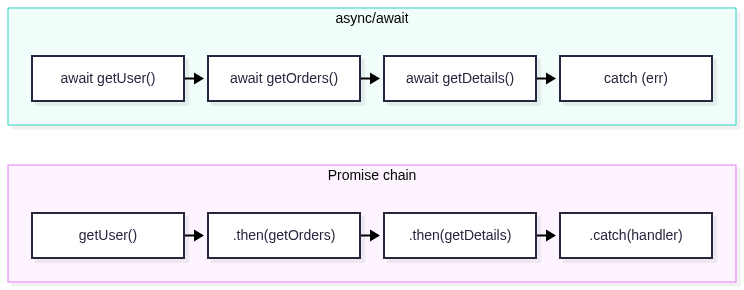
.catch to try/catch.
Running things in parallel
A common mistake once await clicks: awaiting tasks one by one when they don't depend on each other. Here are three independent 100 ms tasks, awaited in sequence, then started together with Promise.all:
async function sequential() {
  const t = Date.now();
  // Each await finishes before the next task even starts
  const a = await wait(100, "a");
  const b = await wait(100, "b");
  const c = await wait(100, "c");
  return `sequential: [${a}, ${b}, ${c}] in ${Date.now() - t} ms`;
}

async function parallel() {
  const t = Date.now();
  // Start all three, then wait for all of them
  const [a, b, c] = await Promise.all([wait(100, "a"), wait(100, "b"), wait(100, "c")]);
  return `Promise.all: [${a}, ${b}, ${c}] in ${Date.now() - t} ms`;
}

console.log(await sequential());
console.log(await parallel());
sequential: [a, b, c] in 334 ms
Promise.all: [a, b, c] in 103 ms
Across three runs: 330–334 ms in sequence, 103–112 ms with Promise.all. The tasks took the same time; the difference is that the sequential version didn't start the second one until the first was done. If step two doesn't need step one's result, start them together. If it does need it, like getOrders(user) above, awaiting in order is correct.
When not to use it
- A single quick step is fine as a one-liner:
fetch(url).then((res) => res.json()). Wrapping that in an async function adds lines without adding clarity. awaitdoesn't make anything faster. It makes slow code easier to read. The speed-up came fromPromise.all.- It's still promises. An async function returns one, so
.thenand.catchwork on its result, and you can mix both styles.
The takeaway: async makes a function return a promise, await pauses that function (not the program) until a promise settles, and try/catch handles failures. Await tasks in order when each needs the last, and use Promise.all when they don't. This post stayed with the basics and skipped Promise.allSettled, for await and the details of error handling inside loops. All of them build on the same ideas.
Look at an await in your own code. Does the line after it need that result, or could the two run at the same time?
Comments
Join the discussionNo comments yet. Be the first to comment.




