One Blueprint, Many Objects: Classes in JavaScript for Beginners
What object-oriented programming means, how classes, constructors and methods work, and the basic idea of encapsulation, with real output

Here are three students, written as plain objects:
const asha  = { name: "Asha",  age: 20, printDetails() { console.log(`Name: ${this.name}, Age: ${this.age}`); } };
const ravi  = { name: "Ravi",  age: 22, printDetails() { console.log(`Name: ${this.name}, Age: ${this.age}`); } };
const meera = { name: "Meera", agee: 19, printDetails() { console.log(`Name: ${this.name}, Age: ${this.age}`); } };
The same shape, typed three times. Spot the bug? Meera has agee, so her details will print Age: undefined. And if you want to change how details are printed, you have to edit it in three places.
A class lets you write that shape once and stamp out as many objects as you need. That's the core of object-oriented programming in JavaScript, and this post builds it up step by step: classes, new, the constructor, methods, and a first look at encapsulation. Every output is real, from Node.js 24.22.
What OOP means
Object-oriented programming (OOP) is a way of organising code around objects. Each object bundles together:
- data about one thing (its properties: a car's colour, a student's name), and
- the actions that work on that data (its methods: drive the car, print the student's details).
Instead of loose variables and functions scattered around, everything about a car lives in the car. OOP is usually described with four ideas: encapsulation, abstraction, inheritance and polymorphism. This post covers the foundation (classes and objects) and the first of those ideas, encapsulation.
The blueprint analogy
A car company doesn't design each car from scratch. Engineers draw one blueprint: where the engine goes, how many doors, what the car can do. The factory then builds thousands of cars from it. Every car follows the same design, but each one has its own colour, its own mileage, its own owner.
In code:
- the class is the blueprint;
- each object (also called an instance) is a car built from it.
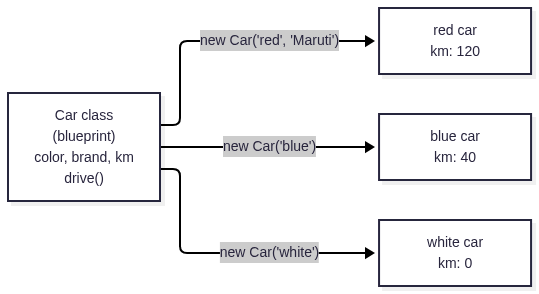
What a class is
A class is written with the class keyword. Here's the car blueprint:
class Car {
  constructor(color, brand = "Tata") {
    this.color = color;
    this.brand = brand;
    this.km = 0;
  }

  drive(distance) {
    this.km += distance;
    return `${this.brand} (${this.color}) has driven ${this.km} km`;
  }
}
Writing this doesn't create any car. It only describes what a car looks like and what it can do. Class names start with a capital letter by convention (Car, Student), which tells readers "this is a blueprint, use new".
A small detail you might notice: typeof Car is "function". Classes are built on JavaScript's older function-based system. The class syntax is a cleaner way to write it, and you don't need the details to use classes well.
Creating objects with new
new builds an object from the class:
const red = new Car("red", "Maruti");
const blue = new Car("blue");
console.log(red);
console.log(blue);
Car { color: 'red', brand: 'Maruti', km: 0 }
Car { color: 'blue', brand: 'Tata', km: 0 }
Two separate cars. blue didn't pass a brand, so it got the default, "Tata". You can check which class an object came from with red instanceof Car, which is true.
new isn't optional. Call the class like a normal function and JavaScript stops you:
TypeError: Class constructor Car cannot be invoked without 'new'
The constructor
The constructor is a special method that runs once, automatically, every time you use new. Its job is to set up the new object's starting values:
constructor(color, brand = "Tata") {
  this.color = color;   // from the argument
  this.brand = brand;   // from the argument, or the default
  this.km = 0;          // every new car starts at 0
}
Inside it, this is the brand-new object being built. this.color = color means "give this new car a color property, set to whatever was passed in". The arguments you pass to new Car(...) arrive as the constructor's parameters.
Methods inside a class
A method is a function written inside the class. It uses this to work with the object it was called on:
console.log(red.drive(120));
console.log(blue.drive(40));
Maruti (red) has driven 120 km
Tata (blue) has driven 40 km
Same method, different results, because this is red in the first call and blue in the second. Each car keeps its own mileage.
Here's what makes classes reusable: the method itself exists only once. Every car shares it:
red.drive === blue.drive:   true
own keys of red:            [ 'color', 'brand', 'km' ]
red stores only its own data (color, brand, km). The drive method lives on the class and is shared by every car you'll ever create. Write it once, fix it once, and every object gets the change. Compare that with the three hand-written students at the top, each carrying its own copy of printDetails.
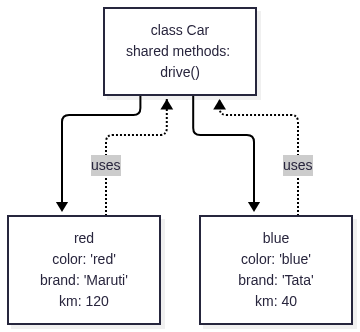
drive() method lives once on the class and is shared.
Encapsulation, the basic idea
Encapsulation means keeping an object's internal data protected, and letting the outside world change it only through methods you control. A bank account is the classic example: you shouldn't be able to set the balance to whatever you like. You deposit, and the account checks the amount.
JavaScript supports this with private fields, written with a #:
class Account {
  #balance = 0;

  constructor(owner) {
    this.owner = owner;
  }

  deposit(amount) {
    if (amount <= 0) throw new Error("Deposit must be positive");
    this.#balance += amount;
  }

  getBalance() {
    return this.#balance;
  }
}

const acc = new Account("Asha");
acc.deposit(500);
acc.getBalance():    500
acc.balance:         undefined
Object.keys(acc):    [ 'owner' ]
acc.deposit(-100):   Deposit must be positive
The balance is only reachable through the class's own methods, and deposit refuses bad amounts. Even printing the object shows only Account { owner: 'Asha' }. Try to reach the private field directly from outside, and JavaScript won't even run the file:
console.log(acc.#balance);
SyntaxError: Private field '#balance' must be declared in an enclosing class
Older code often uses an underscore instead, like this._balance. That's only a naming convention meaning "please don't touch". Nothing enforces it:
loose._balance = -9999; // works fine, and now the balance is -9999
# is a real lock; _ is a polite sign on the door.
When not to bother: for a small script, or a plain data object you pass around and save as JSON, classes and private fields add ceremony without benefit. A plain object { name, age } is fine. Classes earn their place when you have many objects of the same kind, with behaviour that belongs to them.
Try it: the assignment
A Student class with a name, an age, and a method to print details, then several students:
class Student {
  constructor(name, age) {
    this.name = name;
    this.age = age;
  }

  printDetails() {
    console.log(`Name: ${this.name}, Age: ${this.age}`);
  }
}

const asha = new Student("Asha", 20);
const ravi = new Student("Ravi", 22);
const meera = new Student("Meera", 19);

asha.printDetails();
ravi.printDetails();
meera.printDetails();

console.log("Same method for all:", asha.printDetails === meera.printDetails);
Name: Asha, Age: 20
Name: Ravi, Age: 22
Name: Meera, Age: 19
Same method for all: true
Compare it with the opening example. The shape is written once, so there's nowhere for an agee typo to hide, and printDetails exists in one place for all three students.
The takeaway: a class is a blueprint, new builds objects from it, the constructor sets each object's starting data, and methods are shared by every object. Private # fields keep data that shouldn't be touched behind the methods you choose. This post stopped before inheritance (extends, building one class on top of another) and static methods, as the brief asked. Both build directly on what's here.
Look at some code you've written with several similar objects. Which ones would be clearer as instances of one class, and which are better left as plain objects?
Comments
Join the discussionNo comments yet. Be the first to comment.




