Same Three Dots, Opposite Jobs: Spread vs Rest in JavaScript
How the spread operator expands values and the rest operator collects them, with arrays, objects, practical patterns and the traps to avoid
These two lines both use ..., and they do opposite things:
Math.max(...[3, 9, 4]);              // 9

function sum(...nums) {
  return nums.reduce((t, n) => t + n, 0);
}
sum(1, 2, 3);                        // 6
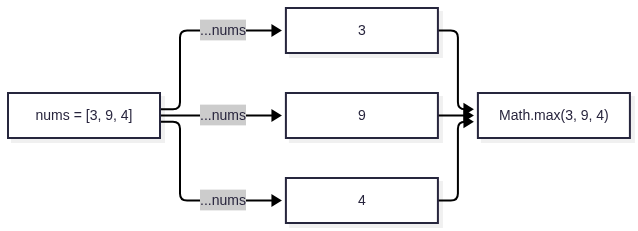
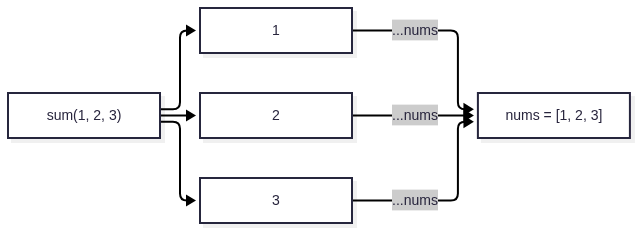
In the first line, ... takes one array and spreads it out into three separate numbers, because Math.max wants separate numbers (Math.max([3, 9, 4]) gives NaN). In the second, ... takes three separate numbers and collects them into one array called nums.
Same three dots, opposite jobs. The first is the spread operator, the second is the rest operator, and the way to tell them apart is simple: look at where the dots are. This post covers both, with arrays and objects, practical patterns, and the traps. Every output is real, from Node.js 24.22.
What the spread operator does
Spread expands an array (or any iterable, like a string or a Set) into its individual values, right where you write it. You'll see it in function calls and array literals, and, further down, in object literals too.
const nums = [3, 9, 4];
Math.max(...nums); // same as Math.max(3, 9, 4) → 9
[..."hi"];         // [ 'h', 'i' ]
A string spreads into its characters, because a string is iterable too.
Spread with arrays
Spreading inside [ ] builds a new array, which makes common jobs one-liners:
const fruits = ["apple", "mango"];

const more = [...fruits, "banana"]; // [ 'apple', 'mango', 'banana' ]
const merged = [...[1, 2], ...[3, 4]]; // [ 1, 2, 3, 4 ]
const copy = [...fruits];
copy.push("kiwi");
copy after push:          [ 'apple', 'mango', 'kiwi' ]
fruits after copy.push:   [ 'apple', 'mango' ]
copy === fruits:          false
copy is a separate array, so changing it left fruits alone. That's why spread is the standard way to add to an array without changing the original.
The shallow-copy trap
That copy only goes one level deep. If the array holds objects, the copy holds the same objects:
const users = [{ name: "Asha" }, { name: "Ravi" }];
const usersCopy = [...users];
usersCopy[0].name = "Changed";
console.log(users[0].name);
Changed
The original changed too. The outer array is new, but both arrays point at the same { name: "Asha" } object. This is called a shallow copy. For a full deep copy, use structuredClone, which is built into modern browsers and Node:
const original = [{ name: "Asha" }];
const deep = structuredClone(original);
deep[0].name = "Changed";
console.log(original[0].name); // Asha
It copies plain data: objects, arrays, strings, numbers, dates and so on. It can't copy functions. An object with a method threw DataCloneError: greet() { return "hi"; } could not be cloned.
Spread with objects
Spread also works inside { }, copying an object's properties into a new object:
const user = { name: "Asha", city: "Pune" };
const moved = { ...user, city: "Mumbai" };
// moved: { name: 'Asha', city: 'Mumbai' }
// user:  { name: 'Asha', city: 'Pune' }   ← unchanged
When two objects have the same key, the one spread later wins. That makes "defaults plus options" easy, as long as you get the order right:
const defaults = { theme: "light", fontSize: 14, lang: "en" };
const options = { theme: "dark" };
{ ...defaults, ...options }:   { theme: 'dark', fontSize: 14, lang: 'en' }
{ ...options, ...defaults }:   { theme: 'light', fontSize: 14, lang: 'en' }
Defaults first, then options, so the user's choice overrides. Swap the order and the defaults quietly overwrite what the user asked for.
One limit: you can spread an array into an object ({ ...[10, 20] } gives { '0': 10, '1': 20 }, with the indexes as keys), but not a plain object into an array:
const settings = { theme: "dark" };
[...settings];
TypeError: settings is not iterable
Array spread needs something it can loop over (an array, string, Set or Map). A plain object isn't one. Spread it into { } instead.
What the rest operator does
Rest collects separate values into one array (or object). It appears where values are being received: in function parameters, and on the left side of destructuring.
As a function parameter, it lets a function take any number of arguments:
function sum(...nums) {
  return nums.reduce((t, n) => t + n, 0);
}
sum(1, 2, 3):   6
sum(5):         5
sum():          0
Inside the function, nums is a real array: [1, 2, 3] for the first call, [] for the last.
In destructuring, rest gathers "everything else". I covered destructuring in Stop Writing user.name Five Times; here's the rest part:
const [first, ...others] = ["red", "green", "blue"];
// first: 'red', others: [ 'green', 'blue' ]

const account = { id: 7, name: "Asha", password: "s3cret" };
const { password, ...safeUser } = account;
// safeUser: { id: 7, name: 'Asha' }
That second one is a neat way to drop a field: pull out password, and everything else lands in safeUser, ready to send.
Rest must be last, since it takes whatever is left. Put anything after it and JavaScript refuses to run:
function f(...items, last) {}          → SyntaxError: Rest parameter must be last formal parameter
const [...rest, last] = [1, 2, 3];     → SyntaxError: Rest element must be last element
Spread vs rest, side by side
| Spread | Rest | |
|---|---|---|
| What it does | Expands one value into many | Collects many values into one |
| Where it appears | Function calls, array and object literals | Function parameters, the left side of destructuring |
| Example | Math.max(...nums), [...a, ...b], { ...defaults } |
function sum(...nums), const [first, ...others] = arr |
| What you get | Separate values, or a new array or object | An array (or an object, in object destructuring) |
The shortcut: if the dots are giving values out, it's spread. If they're receiving values in, it's rest.
Practical use cases
- Updating state without changing it. React and similar libraries expect a new array or object:
setTodos([...todos, newTodo]),setUser({ ...user, city: "Mumbai" }). - Merging settings:
{ ...defaults, ...options }. - Functions with any number of arguments:
sum(...nums),log(level, ...messages). - Removing a field before sending data:
const { password, ...safeUser } = account. - Removing duplicates:
[...new Set([3, 1, 3, 2, 1])]gives[ 3, 1, 2 ]. (More on Set in Map and Set explained.)
When not to use them
For deep copies. Spread copies one level. Nested objects stay shared, as the trap above showed. Use structuredClone when you need everything copied.
For very large arrays in a function call. Spreading passes every item as a separate argument, and there's a limit to how many a call can take. I measured it on my machine with Node.js 24.22:
largest size that worked: ~124,887
first size that failed:   ~125,498 -> RangeError: Maximum call stack size exceeded
Math.max(...bigArray) with about 125,000 items or more crashed. The exact number depends on the engine and its settings, so don't rely on it. A plain loop or reduce handled 1,000,000 items without trouble. Spread is perfect for everyday sizes; for data that could be huge, loop instead.
The takeaway: ... spreads when it gives values out (calls, array and object literals) and collects as rest when it receives them (parameters, destructuring). Spread copies only one level deep, the later key wins when merging objects, and rest always goes last. This post stuck to arrays and objects. Spread also works with Sets, Maps and anything else iterable, following the same rules.
Look at the last object you merged or copied in your code. Was it nested, and did the "copy" actually share data with the original?
Comments
Join the discussionNo comments yet. Be the first to comment.




