Why One Slow Route Freezes Your Fast Route in Node.js
Blocking vs non-blocking code in Node.js, why sync I/O stalls servers, file and DB examples, and real server timings
A /health endpoint that only sends "ok" took 223ms to reply. Nothing was wrong with /health. Another route on the same Node.js server was running a blocking call, and /health had to wait in line behind it.
When I switched that one slow route from blocking to non-blocking, /health dropped from 223ms to 15ms on the same machine. That difference is the whole reason Node.js developers care about blocking vs non-blocking code. Every output and timing below is a real run on Node.js 24.22.1.
Waiting vs continuing: the buzzer analogy
Imagine a fast-food counter with one cashier.
In a blocking shop, you order a burger, and the cashier stands silently watching the grill until your burger is cooked. Nobody behind you can even place an order for a bottle of water.
In a non-blocking shop, the cashier hands you a buzzer, sends the ticket to the kitchen, and takes the next customer's order right away. When your burger is ready, the buzzer rings and you pick it up.
Your Node.js JavaScript code runs on one main thread — one cashier. Blocking code makes that thread wait. Non-blocking code hands the wait off and keeps serving. If you want the broader sync vs async foundation first, see synchronous vs asynchronous JavaScript.
What blocking code means
Blocking code pauses the JavaScript thread until an operation finishes. The next line cannot run until the current one returns.
In Node.js, most blocking I/O functions end with Sync — fs.readFileSync, fs.writeFileSync, crypto.pbkdf2Sync. To run the file examples below, create a file named order.txt containing Order #101: 2 books in the same folder:
// ❌ blocking: the next line waits for the disk read to finish
const fs = require("fs");

console.log("1. Start reading file");
const data = fs.readFileSync("order.txt", "utf8");
console.log("2. File content:", data.trim());
console.log("3. Handle next task");
1. Start reading file
2. File content: Order #101: 2 books
3. Handle next task
Step by step: line 1 prints, line 2 asks the OS to read order.txt and freezes the thread until every byte comes back, then line 3 runs.

For a script that runs once on your laptop, waiting a few milliseconds is harmless. Inside a server handling multiple users, it is a bottleneck.
What non-blocking code means
Non-blocking code starts an operation, registers what should happen when it finishes, and returns control to the JavaScript thread immediately:
// ✅ non-blocking: starts the read and moves on
const fs = require("fs");

console.log("1. Start reading file");
fs.readFile("order.txt", "utf8", (err, data) => {
  if (err) throw err;
  console.log("3. File content:", data.trim());
});
console.log("2. Handle next task");
1. Start reading file
2. Handle next task
3. File content: Order #101: 2 books
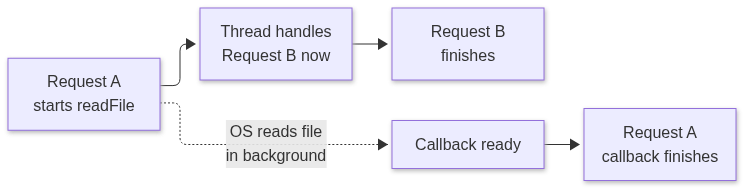
Line 2 (Handle next task) ran while the file was still being read. Once the OS finished reading order.txt, Node.js queued the callback and ran it after the current stack cleared.
Why blocking slows servers: real timings
To see the server impact directly, I built a minimal two-route HTTP server on 127.0.0.1. /hash hashes a password (an expensive operation), and /health immediately replies "ok".
The test sends a request to /hash, waits 10ms, and sends a request to /health. First with crypto.pbkdf2Sync (blocking), then with crypto.pbkdf2 (non-blocking). This is server.js. Run node server.js for the blocking version and node server.js async for the non-blocking one:
// server.js
const http = require("http");
const crypto = require("crypto");

const blocking = process.argv[2] !== "async"; // node server.js async -> non-blocking

const server = http.createServer((req, res) => {
  if (req.url === "/hash") {
    if (blocking) {
      crypto.pbkdf2Sync("secret", "salt", 300000, 64, "sha512");
      res.end("hashed");
    } else {
      crypto.pbkdf2("secret", "salt", 300000, 64, "sha512", (err) => {
        if (err) {
          res.statusCode = 500;
          return res.end("error");
        }
        res.end("hashed");
      });
    }
  } else {
    res.end("ok");
  }
});

server.listen(3000, "127.0.0.1");
And this is client.js, run in a second terminal while the server is up. It prints each response in the order it finished:
// client.js
const http = require("http");

function get(path) {
  const t = Date.now();
  return new Promise((resolve) => {
    http.get({ host: "127.0.0.1", port: 3000, path, agent: false }, (res) => {
      res.resume();
      res.on("end", () => resolve(`${path} done in ${Date.now() - t}ms`));
    });
  });
}

(async () => {
  const hash = get("/hash");
  await new Promise((r) => setTimeout(r, 10));
  const health = get("/health");
  const order = [];
  hash.then((m) => order.push(m));
  health.then((m) => order.push(m));
  await Promise.all([hash, health]);
  console.log(order.join("\n"));
})();
Here is the real output from Node.js 24.22.1, first run of each:
Blocking server (node server.js):
/hash done in 250ms
/health done in 223ms
Non-blocking server (node server.js async):
/health done in 15ms
/hash done in 290ms
Look at /health:
- Under the blocking route,
/healthcould not even be read by the server untilpbkdf2Syncreleased the thread, so it took 223ms. - Across six runs of each version on this machine,
/healthtook 190 to 260ms against the blocking route and 8 to 17ms against the non-blocking one. Under the non-blocking route, Node.js handed the hash work off to its background thread pool (libuv defaults to 4 worker threads, so heavy concurrency can still queue behind those workers), served/healthin 15ms, and finished/hashwhen the background worker returned.
Multiply that by fifty users hitting /hash and two hundred hitting /health. One blocking call in one route degrades the entire process, turning fast endpoints into slow ones until every queued blocking task finishes.
Async operations in Node.js: callbacks vs async/await
Node.js started with callback-style APIs like fs.readFile(path, cb), and modern Node.js provides Promise-based versions under fs/promises. Using async and await reads top-to-bottom while remaining non-blocking:
const fs = require("fs/promises");

async function readOrder() {
  console.log("1. Start reading file");
  const data = await fs.readFile("order.txt", "utf8");
  console.log("3. File content:", data.trim());
}

readOrder();
console.log("2. Handle next task");
1. Start reading file
2. Handle next task
3. File content: Order #101: 2 books
Notice that await only pauses readOrder itself — it does not block the main thread. 2. Handle next task still printed before the file finished reading. For a deeper walkthrough of Promises and await, see from .then() chains to async/await.
Real-world examples: file reads and database calls
File handling. If an API endpoint reads an uploaded CSV or an HTML template on every request, using fs.readFileSync freezes every concurrent user while disk I/O completes. Switching to await fs.readFile(...) lets other requests proceed during the read. When you need to read several independent files for one response — say a header, a body, and a footer — passing them to Promise.all starts all three disk reads at once instead of waiting for each file before opening the next.
Database calls. Every database driver in Node.js (PostgreSQL, MySQL, MongoDB, Redis) is asynchronous because network round trips are slow compared to CPU instructions. Non-blocking queries keep the server responsive to other users, and Promise.all lets independent queries for the same user overlap too. Watch out for one subtle trap: writing three await fetchUser(...) lines one after another won't block other users, but it still makes that single user wait for all three queries sequentially.
Here is a minimal constructed example simulating three 100ms database queries:
// Constructed example simulating a 100ms database query
function fetchUser(id) {
  return new Promise((resolve) => {
    setTimeout(() => resolve({ id, name: `User ${id}` }), 100);
  });
}

async function main() {
  const t0 = Date.now();
  const [u1, u2, u3] = await Promise.all([
    fetchUser(1),
    fetchUser(2),
    fetchUser(3),
  ]);
  console.log("Users:", u1.name, u2.name, u3.name);
  console.log(`Total time: ${Date.now() - t0}ms`);
}
main();
Users: User 1 User 2 User 3
Total time: 109ms
Three 100ms waits overlapped and finished in about 110ms total instead of 300ms+. If those calls had blocked the thread one after another, every user would wait for the full sum.
When blocking code is fine (and when NOT to use it)
Non-blocking is not mandatory everywhere. Use blocking *Sync methods in two narrow situations:
- One-time startup setup: reading a config file or SSL certificate before
server.listen()starts accepting traffic. - Short CLI scripts and build tools: a script that processes one file for one developer on the command line, where concurrency does not matter.
Avoid blocking calls anywhere inside an HTTP request handler, WebSocket listener, or background worker serving multiple users. Also watch out for blocking code that does not end in Sync: JSON.parse() on a 50 MB string, heavy regular expressions, and tight for loops block the thread the same way.
Where this leaves you
Blocking code freezes Node's single JavaScript thread until an operation finishes; non-blocking code hands the wait off so other requests keep moving. Inside any server route, reach for fs/promises and async APIs by default, and keep *Sync calls for startup or one-off scripts.
One honest limit: the /health numbers above (223ms vs 15ms, with six runs of each in the ranges above) come from a two-request local test on one machine, not a production load test, and this post does not cover scaling CPU-bound work with Worker Threads or clustering. Have you ever tracked a slow endpoint back to a *Sync call hidden inside a helper or middleware?
Comments
Join the discussionNo comments yet. Be the first to comment.