Node.js Isn't a Language: Why document and window Don't Exist There
JavaScript runtime vs language, browser JS vs server JS, V8 and libuv at a high level, and how Node.js compares to PHP and Java
Run this five-line script with node and watch what is missing:
console.log("document:", typeof document);
console.log("window:", typeof window);
console.log("process:", typeof process);
console.log("Node version:", process.versions.node);
console.log("V8 version:", process.versions.v8);
document: undefined
window: undefined
process: object
Node version: 24.22.1
V8 version: 13.6.233.17-node.58
document and window do not exist here, while process — an object describing the running OS process — does. That output clears up the two biggest misconceptions about Node.js: it is not a programming language, and it is not a browser. It is a JavaScript runtime built to run JavaScript directly on your computer or server.
Every output below comes from a real run on Node.js 24.22.1.
Runtime vs programming language: the kitchen analogy
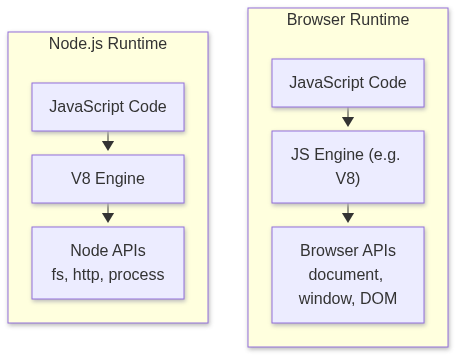
A programming language (JavaScript) defines the syntax and rules: variables, loops, functions, objects, and Promises. A runtime environment is the host that actually executes your code and gives it tools to interact with the outside world.
Think of JavaScript as a recipe and the runtime as the kitchen:
- Browser JS is a dining-room kitchen built for the user's screen. Its tools are the DOM (
document),window,localStorage, and click events. - Node.js (server JS) is a back-of-house kitchen built for the operating system. Its tools are the filesystem (
fs), network servers (http), environment variables (process.env), and child processes.
The language is identical in both places. Only the tools handed to your code change.
Why JavaScript started as browser-only
JavaScript was created in 1995 to make static web pages interactive inside the browser — validating forms, toggling menus, and updating HTML without reloading the page. If you want to see how the browser parses HTML, CSS, and JavaScript together, read how a browser works.
For over a decade, JavaScript lived almost entirely inside the browser sandbox (early server-side attempts existed, but they stayed niche). That sandbox existed for safety: a random website should not be able to read files off your hard drive or open raw network sockets. As a result, web teams wrote JavaScript for the browser and used a separate language — PHP, Java, Python, or Ruby — on the server.
How Node.js brought JavaScript to the server
In 2009, Ryan Dahl took V8 — the open-source JavaScript engine Google built for Chrome — out of the browser and embedded it inside a C++ program wired to OS networking and filesystem calls. Today, Node.js handles cross-platform async I/O (files, TCP/HTTP networking, timers) through a C library called libuv.
At a high level, V8 is what turns your JavaScript into fast execution: it runs bytecode first for quick startup and JIT-compiles frequently executed functions into native machine code. That is why process.versions.v8 printed 13.6.233.17-node.58 in our first snippet — V8 is literally sitting inside Node.js.
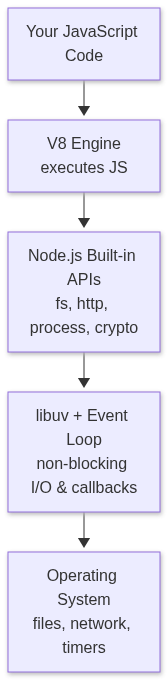
Putting the pieces together gives the whole Node.js architecture in four layers: your JavaScript code runs on V8, calls Node's built-in APIs (fs, http, crypto), which hand I/O work through libuv to the operating system.
Event-driven architecture in ten lines
Instead of pausing a thread while waiting for an incoming request or a disk read, Node.js uses an event-driven, non-blocking model. You register a function to run when an event happens — such as an HTTP request arriving — and Node.js invokes it when ready.
You do not even need a framework to start a real web server in Node.js. The built-in http module handles it directly:
// server.js (Node.js 24.22.1)
const http = require("http");

const server = http.createServer((req, res) => {
  res.writeHead(200, { "Content-Type": "application/json" });
  res.end(JSON.stringify({ message: "Hello from Node.js", path: req.url }));
});

server.listen(3000, "127.0.0.1", () => {
  console.log("Listening on http://127.0.0.1:3000");
});
Requesting GET /status from that server with Node's built-in fetch:
// client.js: run while server.js is listening
fetch("http://127.0.0.1:3000/status").then(async (res) => {
  console.log(res.status, res.headers.get("content-type"), await res.text());
});
returned:
200 application/json {"message":"Hello from Node.js","path":"/status"}
That callback (req, res) => { ... } is an event listener. Every time a client connects, Node.js fires the request event and calls your function.
Node.js vs traditional backend runtimes (PHP and Java)
Developers did not adopt Node.js because PHP or Java were broken. They adopted it because Node.js offered a different trade-off — especially for I/O-heavy web apps and full-stack teams:
| Dimension | Node.js | Traditional PHP (e.g., Apache/PHP-FPM) | Traditional Java (e.g., Servlet/Spring) |
|---|---|---|---|
| Language | JavaScript (and TypeScript) | PHP | Java (JVM) |
| Process model | Long-running single-threaded event loop | Fresh script lifecycle per request | Long-running multi-threaded JVM |
| Concurrency style | Non-blocking async I/O on one JS thread | Multiple worker processes | Thread pool (and modern virtual threads) |
| Shared frontend code | Yes (same language, types, validators) | No | No |
Two practical reasons drove adoption:
- One language across frontend and backend. Teams could share validation schemas, TypeScript types, and engineers across browser and server without switching languages.
- Low-overhead concurrency for I/O. Keeping thousands of lightweight network connections open (such as chat sockets or API gateways) fits Node's event loop naturally.
Real-world use cases of Node.js
Today Node.js shows up in four main places:
- REST and GraphQL APIs: backend services built with Express, Fastify, or NestJS that talk to databases and return JSON.
- Real-time applications: chat apps, live collaboration, and notification servers over WebSockets.
- Developer tooling and CLIs: bundlers, linters, and dev servers such as Vite, ESLint, and Prettier all run on Node.js.
- Server-side rendering (SSR) and BFF layers: frameworks like Next.js use Node.js to render React components on the server before sending HTML to the browser.
When NOT to choose Node.js
Because your JavaScript runs on one main thread, Node.js is a poor fit for CPU-heavy computation — video transcoding, heavy image processing, machine learning training, or large numerical simulations. A long synchronous calculation blocks the event loop and stalls other incoming requests. For those workloads, languages with native multi-threaded CPU throughput (like Go, Rust, Java, or C++), or Python backed by native C/CUDA libraries, are better choices.
Where this leaves you
JavaScript is the language; Node.js is the runtime that took V8 out of the browser and added OS-level APIs (fs, http, process) on top of an event-driven loop. Reach for it when you want one language across the stack or an I/O-heavy server, and keep heavy CPU work elsewhere.
One honest limit: this post kept V8 and libuv at a high level and skipped newer JavaScript server runtimes like Deno and Bun, which follow the same "JS outside the browser" idea with different defaults. What first made you pick up Node.js — building an API, running frontend build tools, or wanting to stick to one language?
Comments
Join the discussionNo comments yet. Be the first to comment.




