Is HTTP the Same as TCP? TCP, UDP and Where HTTP Fits
TCP vs UDP in plain terms, when to use each, and why HTTP runs on top of TCP instead of replacing it
"Is HTTP the same as TCP?" is a fair question, because they show up together everywhere. Here's curl fetching a page with the -v flag, which prints what happens underneath (output trimmed):
curl -v http://example.com/
*   Trying 172.66.147.243:80...
* Established connection to example.com (172.66.147.243 port 80) from …
> GET / HTTP/1.1
> Host: example.com
< HTTP/1.1 200 OK
Two different protocols, one after the other. The "Established connection" line is TCP: a connection between two machines. The GET and 200 OK lines are HTTP: what's said over that connection. They aren't the same thing, and they aren't rivals. They're layers. This post covers TCP vs UDP, when to use each, and how HTTP fits on top. The commands ran with curl 8.22 and Node.js 24.22 on Windows 11.
The internet needs rules for sending data
When your laptop sends data to a server, it doesn't travel as one piece. It's cut into packets, and each packet finds its own way across the network. Packets can arrive late, out of order, twice, or not at all.
Something has to decide what to do about that. Should the sender wait to hear that a packet arrived? Resend it if it didn't? Put packets back in order? Those decisions are a protocol: a set of rules both sides agree on. TCP and UDP are the two main sets of rules for moving data between programs, and they answer those questions in opposite ways.
TCP: a phone call
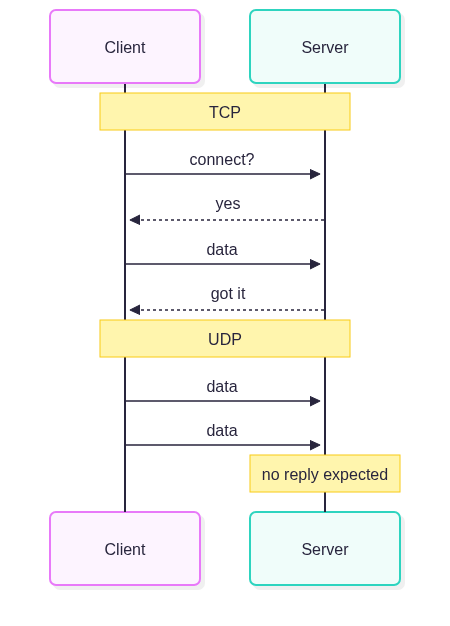
TCP (Transmission Control Protocol) works like a phone call. Before anyone talks, the call has to connect: both sides agree they're there. Then:
- Everything you say arrives in order.
- If something gets lost, it's sent again automatically.
- The other side confirms what it received.
- When you're done, the call is closed properly.
The cost is setup time and extra back-and-forth. The benefit is that the program on the other end gets exactly the bytes you sent, in the order you sent them, or a clear error.
UDP: an announcement
UDP (User Datagram Protocol) works like an announcement over a loudspeaker. You say it once and move on. There's no connection first, no confirmation, no resending. If a message is lost, UDP doesn't notice. If two arrive out of order, UDP doesn't fix it.
That sounds worse, and for a lot of jobs it is. But it also means no setup and no waiting, which is exactly what some applications need.
Try it: the same message to a closed port
The difference is easiest to see when something goes wrong. This script sends hello over TCP and over UDP to port 9999 on my own machine, where nothing is listening:
// closed-port.js
const net = require("node:net");
const dgram = require("node:dgram");
const PORT = 9999; // nothing is listening here

const tcp = net.connect(PORT, "127.0.0.1", () => console.log("TCP: connected"));
tcp.on("error", (err) => console.log("TCP:", err.code));

const udp = dgram.createSocket("udp4");
udp.send("hello", PORT, "127.0.0.1", (err) => {
  console.log("UDP: send callback, error =", err ?? null);
  udp.close();
});
UDP: send callback, error = null
TCP: ECONNREFUSED
TCP tried to set up the call, nobody picked up, and it reported ECONNREFUSED: connection refused. UDP sent its message into the void and reported no error, because from UDP's point of view sending worked. Whether anyone heard is not its problem. That's the whole difference, in two lines.
Key differences at a glance
| TCP | UDP | |
|---|---|---|
| Connection | Set up first | None |
| Delivery | Guaranteed, or an error | Best effort |
| Order | Kept | Not kept |
| Lost data | Resent | Gone |
| Overhead | More | Less |
| Analogy | Phone call, courier | Announcement, live broadcast |
When to use TCP, and when to use UDP
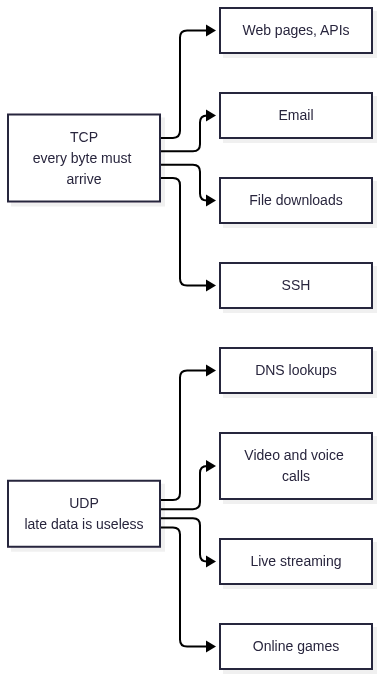
Use TCP when every byte has to arrive. A web page with a missing chunk of HTML is broken. A bank transfer can't skip a digit. So TCP carries:
- web pages and APIs (HTTP/1.1 and HTTP/2),
- email,
- file downloads,
- SSH sessions to remote servers.
Use UDP when late data is useless. In a video call, a packet from half a second ago is no help; resending it would only freeze the picture while the call moves on. Better to skip it and show the next frame. UDP is the usual choice for:
- DNS lookups, where one question and one answer usually fit in a packet each (DNS switches to TCP for answers that don't),
- video and voice calls,
- live streaming,
- online multiplayer games.
When not to use each. TCP's "everything in order" rule has a cost: if one packet is lost, everything behind it waits until it's resent. For a real-time game, that stall is worse than a missing update. And UDP is a poor choice if you need reliability and are tempted to build it yourself: acknowledgements, retries and ordering are hard to get right, and TCP already does them.
What HTTP is, and where it fits
HTTP (HyperText Transfer Protocol) is the language browsers and servers use to talk about web content: "GET me /index.html", "here it is, 200 OK", "that page doesn't exist, 404". It defines methods, paths, headers and status codes.
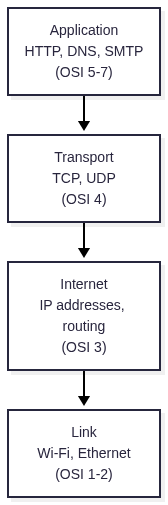
What HTTP doesn't define is how the bytes get from one machine to the other. It doesn't resend lost packets or put them in order. It assumes something underneath already does. That's the difference between an application protocol (what to say) and a transport protocol (how to deliver it).
Networking is usually drawn as layers, each doing one job for the layer above. The simplified TCP/IP model has four; the older OSI model splits the same work into seven:
How HTTP rides on TCP
Put the layers together and the curl output from the top makes sense. First, TCP sets up a connection to port 80. Then HTTP sends its request as text through that connection, and the response comes back the same way:

So "is HTTP the same as TCP?" has a clean answer: no. HTTP is the letter; TCP is the courier that guarantees it arrives intact and in order. HTTP can't replace TCP because it doesn't do TCP's job, and TCP can't replace HTTP because it has no idea what a web page is. Each one only works because the other exists.
Where the simple model leaks
HTTP/3 doesn't run on TCP. Everything above holds for HTTP/1.1 and HTTP/2. HTTP/3 (RFC 9114) runs over QUIC (RFC 9000), and QUIC runs over UDP. QUIC rebuilds connections, acknowledgements and resending itself, on top of UDP, partly to avoid the "one lost packet blocks everything" problem. The curl response above even advertised it, in a header I trimmed:
< alt-svc: h3=":443"; ma=86400
That's the server saying "HTTP/3 is available on port 443". Whether a browser actually switches depends on the browser and the network between you and the server; when I reloaded example.com in Chrome 157, it still used HTTP/2 (nextHopProtocol reported h2).
That's the real lesson: "UDP is unreliable" describes UDP itself, not every application built on it. Reliability can live in the layer above.
"UDP is faster" is a simplification. UDP skips the setup and the waiting, so the first byte can go out sooner. But it doesn't make your network faster, and once an application adds its own reliability, much of that difference is up to the application. "Lower overhead" is the accurate phrase.
The layering in one line: HTTP decides what to say, TCP (or QUIC over UDP) makes sure it arrives, and IP gets each packet to the right machine. This post stayed at the behaviour level and skipped the internals: handshakes, ports in detail, congestion control. If you want to see where all this happens in a page load, I walked through it in how a browser works.
Open DevTools → Network on a site you use, right-click the column headers and turn on Protocol. Do you see h2, h3, or http/1.1?
Comments
Join the discussionNo comments yet. Be the first to comment.




