One JS Thread, Five Concurrent Requests: How Node.js Does It
Process vs thread, the chef analogy, event loop concurrency, libuv's 4-thread worker pool, and why Node.js scales, with real output
If Node.js runs JavaScript on a single thread, five 150ms requests ought to take at least 750ms. Here is what actually happened when I fired five concurrent HTTP requests at one Node.js server:
// Constructed example simulating a 150ms async DB/API call per request
const http = require("http");

const server = http.createServer((req, res) => {
  setTimeout(() => {
    res.writeHead(200, { "Content-Type": "text/plain" });
    res.end(`done ${req.url}`);
  }, 150);
});

server.listen(3000, "127.0.0.1");
And this client (run in a second terminal while the server is up) fires the five requests at once:
// client.js: run while server.js is listening
const start = Date.now();

Promise.all(
  [1, 2, 3, 4, 5].map(async (i) => {
    const res = await fetch(`http://127.0.0.1:3000/order/${i}`);
    console.log(`${await res.text()} at ${Date.now() - start}ms`);
  })
).then(() => console.log(`Total for 5 requests: ${Date.now() - start}ms`));
done /order/1 at 252ms
done /order/2 at 254ms
done /order/3 at 255ms
done /order/4 at 256ms
done /order/5 at 257ms
Total for 5 requests: 257ms
All five finished within a few milliseconds of each other — in 257ms total in this run, not 750ms+. Across three more runs here the totals were 296ms, 227ms and 256ms, so the exact number moves, but it stays far below 750ms. The extra time beyond 150ms is mostly connection setup. Your JavaScript ran on one thread, yet all five requests overlapped. This post explains how Node.js pulls that off by combining event-loop concurrency with background delegation.
Every output below comes from a real run on Node.js 24.22.1.
Process vs thread, explained
Before looking at Node.js, separate two operating-system terms:
- Process: a running program with its own isolated memory space. When you run
node server.js, the OS starts one Node.js process. - Thread: a single path of execution living inside a process. Threads inside the same process share memory and can execute instructions independently.
Think of a restaurant building as a process (its own walls, pantry, and kitchen) and the cooks inside as threads.
When people say "Node.js is single-threaded," they mean your JavaScript code runs on one main thread inside that process. They do not mean the entire Node.js process only ever uses one OS thread — as you will see in a moment, Node.js quietly delegates heavy I/O and crypto work to the OS and a small pool of background worker threads.
The chef-handling-orders analogy
Picture one head chef running a kitchen with several ovens and four prep helpers:
- Five orders arrive within the same second.
- The head chef does not put dish #1 in the oven and stare through the glass for 15 minutes.
- Instead, the chef preps order #1, hands it to an oven or a prep helper, and immediately starts order #2, #3, #4, and #5.
- Whenever a timer dings or a helper finishes a task, the chef plates that dish and sends it out.
In Node.js:
- The head chef is your single JavaScript thread.
- The order rail is the event loop deciding which ready callback the chef handles next.
- The ovens and prep helpers are the operating system's async networking layer and libuv's background worker pool.
Single-threaded JS and the event loop: concurrency, not parallelism
Notice what the head chef is doing: concurrency, not parallelism.
- Concurrency means juggling multiple in-flight requests by switching between them whenever one starts waiting.
- Parallelism means running two lines of your JavaScript at the exact same instant on two CPU cores.
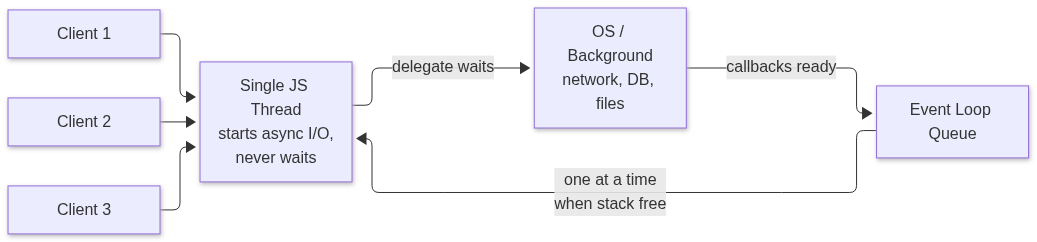
Your single JavaScript thread never runs two request callbacks in parallel. Instead, each request only needs a tiny slice of JavaScript (reading headers, starting a database call, writing a JSON response) and spends almost all of its time waiting on I/O. The event loop interleaves those quick JavaScript slices across dozens or thousands of concurrent clients. If you want the sync vs async basics first, see synchronous vs asynchronous JavaScript.
Delegating tasks to background workers
Where does the waiting actually happen when your single JS thread hands a task off? Node.js splits delegated work across two paths:
- OS async primitives (network I/O): TCP sockets and HTTP requests go straight to the operating system kernel (
epollon Linux,kqueueon macOS,IOCPon Windows). The OS notifies Node.js when data arrives — no extra thread per socket is needed. Timers need no thread at all: the event loop itself tracks when each one is due. - libuv's background worker pool (default: 4 threads): operations that do not have clean non-blocking OS primitives everywhere — file system calls (
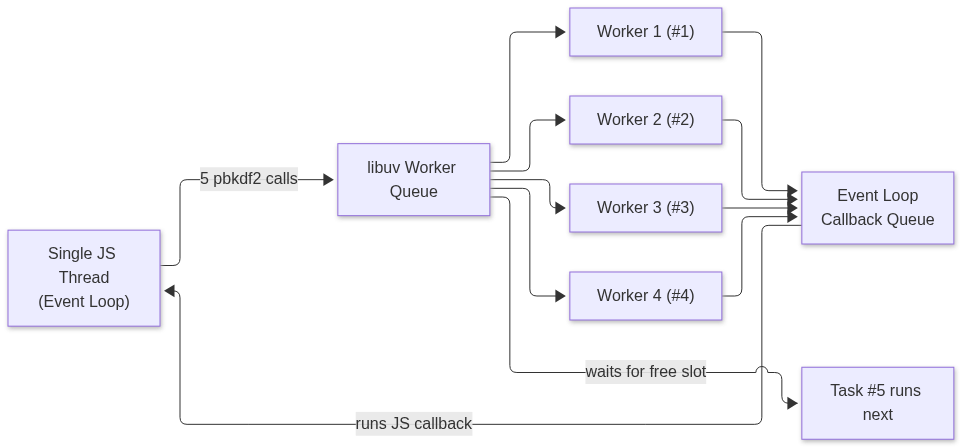
fs),dns.lookup, compression (zlib), and heavy crypto (crypto.pbkdf2) — are handed to a pool of 4 background worker threads.
You can see that 4-thread pool directly in Node.js 24.22.1 by starting 5 concurrent crypto.pbkdf2 calls:
const crypto = require("crypto");

const start = Date.now();
for (let i = 1; i <= 5; i++) {
  crypto.pbkdf2("password", "salt", 150000, 64, "sha512", (err) => {
    if (err) throw err;
    console.log(`hash #${i} finished at ${Date.now() - start}ms`);
  });
}
hash #3 finished at 174ms
hash #2 finished at 180ms
hash #1 finished at 181ms
hash #4 finished at 183ms
hash #5 finished at 277ms
Look at those timestamps. In this run, four hashes (#3, #2, #1, #4) ran at the same time on the four background workers and finished between 174ms and 183ms. Hash #5 had to wait for one worker to finish before starting, so it completed about 100ms later at 277ms. Exact times vary: in three more runs on this machine the first four finished anywhere between roughly 157ms and 279ms, but #5 was always last, 57 to 78ms after the fourth one. The overlap also depends on having enough free CPU cores; this machine has 12. Once each worker finished, it dropped its callback into the event loop queue so the single JS thread could print the line.
Why Node.js scales well for multiple clients
Hypothetically, compare two server designs under 5,000 simultaneous users who are mostly waiting on database responses:
- Thread-per-request server: spawns or parks thousands of OS threads. Each thread reserves its own stack memory, and the OS burns CPU cycles switching between sleeping threads.
- Node.js single JS thread + async I/O: one JavaScript thread holds lightweight state for all 5,000 in-flight requests while the OS tracks the network sockets. Memory overhead per idle connection stays small, and the main thread only wakes up when bytes actually arrive.
That is why a single Node.js process handles high-concurrency APIs, chat servers, and BFF layers smoothly without spawning a thread per client.
When NOT to rely on a single Node.js thread
The head-chef model breaks down the moment your own JavaScript refuses to let go of the main thread:
- CPU-heavy JavaScript loops (image manipulation, huge synchronous
JSON.parse, heavy math) keep the chef busy so zero other requests can be accepted or answered. - Saturating the 4-thread worker pool with heavy
fsorpbkdf2work creates a queue behind those four workers, as hash#5showed above.
When you need real parallel CPU execution across multiple cores in Node.js, you move past one main thread: offload CPU tasks to Node's worker_threads module, run multiple Node.js processes (via cluster or multiple container replicas behind a load balancer), or hand the job to a background queue worker.
Where this leaves you
Node.js handles multiple requests on a single JavaScript thread by never letting that thread sit idle waiting on I/O: the event loop interleaves quick JavaScript steps concurrently while delegating network waits to the OS and file/crypto work to libuv's 4-thread worker pool.
One honest limit: both timing runs above (257ms for 5 HTTP requests, 174–277ms for 5 hashes) are single-machine local runs on Node 24.22.1, not production load tests, and this post skipped tuning UV_THREADPOOL_SIZE and writing custom worker_threads code. Did seeing hash #5 lag behind hashes #1–#4 change how you picture "single-threaded" Node.js?
Comments
Join the discussionNo comments yet. Be the first to comment.




