Signed, Not Encrypted: How JWT Authentication Works in Express.js
Header, payload, signature, stateless login, Bearer tokens, route protection, and JWT security basics in Node.js
Take any JWT your server issues, split it on ., and decode the middle part in Node.js — without knowing the secret key:
// No secret key needed to read a JWT's header or payload
// (token is the string returned by POST /login, shown below)
const [headerB64, payloadB64] = token.split(".");
console.log("header: ", Buffer.from(headerB64, "base64url").toString("utf8"));
console.log("payload:", Buffer.from(payloadB64, "base64url").toString("utf8"));
header:  {"alg":"HS256","typ":"JWT"}
payload: {"sub":1,"email":"asha@example.com","role":"member","iat":1795522448,"exp":1795523348}
Anyone holding a JWT can read its payload. A JWT is signed, not encrypted. Its job is not to hide data — its job is to prove the server issued the token and nobody altered it since.
Every output below comes from a real run on Node.js 24.22.1, Express 5.3.0, and jsonwebtoken 9.0.3.
Why authentication is needed (and what stateless auth means)
HTTP is stateless: each request arrives without memory of the previous one. When a user logs in on POST /login and then opens GET /profile, the server has no built-in way to know both requests came from the same person.
Authentication verifies who the caller is (usually by checking credentials once at login and issuing a proof for later requests). There are two common ways to carry that proof:
- Session-based (stateful): the server stores a session record in a database or Redis and hands the client a random session ID. Every later request looks up that ID on the server.
- Token-based (stateless, such as JWT): the server packs the user's ID and role into a signed token and hands it to the client. On later requests, the server verifies the signature mathematically without needing a session table lookup.
Think of a stamped concert wristband: security does not check a guest list on every re-entry — they check that the stamp is genuine and still valid.
Structure of a JWT: header, payload, signature
A JWT (JSON Web Token) is a string made of three Base64URL-encoded pieces joined by dots:
<header>.<payload>.<signature>
- Header: metadata about the token — the signing algorithm (
"alg": "HS256") and token type ("typ": "JWT"). - Payload: the claims (data) you attach, such as
"sub": 1(subject / user ID),"role": "member","iat"(issued-at timestamp), and"exp"(expiry timestamp). Because it is Base64URL-encoded, never store passwords, API keys, or sensitive personal data here. - Signature: generated by hashing the encoded header and payload together with a secret key that only your server knows. If someone changes
"role": "member"to"role": "admin"in the payload, the signature no longer matches and verification fails.
| Part | Encoded as | Readable by client? | Protected against tampering? |
|---|---|---|---|
| Header | Base64URL JSON | Yes | Yes (covered by signature) |
| Payload | Base64URL JSON | Yes | Yes (covered by signature) |
| Signature | Hash using server secret | Opaque bytes | Proves integrity of header + payload |
Login flow using JWT
Install Express and jsonwebtoken (npm install express jsonwebtoken). When a user logs in with valid credentials, the server signs a short-lived token and returns it:
// server.js (Node.js 24.22.1, Express 5.3.0, jsonwebtoken 9.0.3)
const express = require("express");
const jwt = require("jsonwebtoken");

const app = express();
app.use(express.json());

// Run locally with: JWT_SECRET="dev-secret-change-me" node server.js
const SECRET = process.env.JWT_SECRET;
if (!SECRET) throw new Error("JWT_SECRET environment variable is required");

app.post("/login", (req, res) => {
  const { email, password } = req.body || {};
  // Local demo only: real apps verify a hashed password from a database
  if (email !== "asha@example.com" || password !== "pass123") {
    return res.status(401).json({ error: "Invalid credentials" });
  }

  const token = jwt.sign({ sub: 1, email, role: "member" }, SECRET, {
    algorithm: "HS256",
    expiresIn: "15m",
  });
  res.status(200).json({ token });
});

Notice expiresIn: "15m". jsonwebtoken turns that into the "exp" claim inside the payload automatically, so the token stops working 15 minutes after login. Also notice the generic "Invalid credentials" error on failure — returning the same message for an unknown email and a wrong password avoids revealing which emails exist in your system.
Sending tokens and protecting routes
On subsequent requests, the client sends the token in the Authorization HTTP header with the Bearer prefix:
Authorization: Bearer <header>.<payload>.<signature>
From JavaScript (browser or Node.js fetch), that looks like:
const res = await fetch("http://127.0.0.1:3000/profile", {
  headers: { Authorization: `Bearer ${token}` },
});
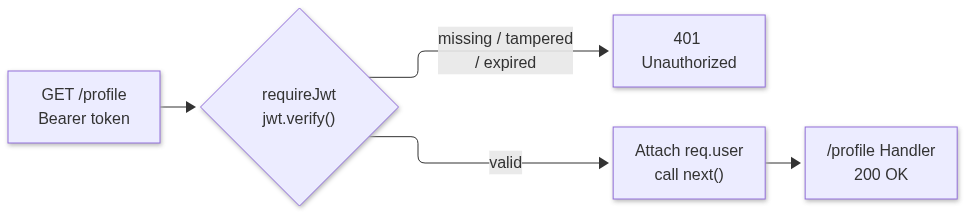
On the server, a middleware extracts the token, verifies its signature and expiry with jwt.verify, attaches the decoded claims to req.user, and calls next(). Notice that the middleware does not return 403 Forbidden when a token is missing or invalid — 401 Unauthorized means "we do not know who you are", while 403 means "we know who you are, and you lack permission for this route":
function requireJwt(req, res, next) {
  const header = req.headers.authorization || "";
  if (!header.startsWith("Bearer ")) {
    return res.status(401).json({ error: "Missing Bearer token" });
  }
  const token = header.slice(7);
  try {
    req.user = jwt.verify(token, SECRET, { algorithms: ["HS256"] });
    next();
  } catch (err) {
    // Returning err.message here makes the failure reason visible; in production, return a generic message
    return res.status(401).json({ error: err.message });
  }
}

app.get("/profile", requireJwt, (req, res) => {
  res.status(200).json({ id: req.user.sub, email: req.user.email, role: req.user.role });
});

app.listen(3000, () => console.log("Listening on http://127.0.0.1:3000"));
Real HTTP runs: valid, tampered, and expired tokens
I ran this server on Node.js 24.22.1 with Express 5.3.0 and jsonwebtoken 9.0.3 and tested five cases: logging in, calling /profile with no header, calling with the valid token, modifying "role" to "admin" in the payload, and sending an expired token. Start the server with JWT_SECRET="dev-secret-change-me" node server.js, then run this client in a second terminal with the same JWT_SECRET set:
// client.js (run while server.js is listening; JWT_SECRET must match the server's)
const jwt = require("jsonwebtoken");

const base = "http://127.0.0.1:3000";

async function get(label, token) {
  const res = await fetch(base + "/profile", {
    headers: token ? { Authorization: `Bearer ${token}` } : {},
  });
  console.log(`GET /profile (${label}) -> ${res.status} ${await res.text()}`);
}

(async () => {
  const login = await fetch(base + "/login", {
    method: "POST",
    headers: { "Content-Type": "application/json" },
    body: JSON.stringify({ email: "asha@example.com", password: "pass123" }),
  });
  const { token } = await login.json();
  console.log(`POST /login -> ${login.status} token parts: ${token.split(".").length}`);

  await get("no header");
  await get("valid", token);

  // Tampered: change the role in the payload, keep the original signature
  const [header, payload, signature] = token.split(".");
  const claims = JSON.parse(Buffer.from(payload, "base64url").toString("utf8"));
  const forged = Buffer.from(JSON.stringify({ ...claims, role: "admin" })).toString("base64url");
  await get("tampered", `${header}.${forged}.${signature}`);

  // Expired: a token whose expiry is already in the past
  const { iat, exp, ...rest } = claims; // sign() sets these itself
  const expired = jwt.sign(rest, process.env.JWT_SECRET, { expiresIn: -10 });
  await get("expired", expired);
})();
Real output:
POST /login -> 200 token parts: 3
GET /profile (no header) -> 401 {"error":"Missing Bearer token"}
GET /profile (valid) -> 200 {"id":1,"email":"asha@example.com","role":"member"}
GET /profile (tampered) -> 401 {"error":"invalid signature"}
GET /profile (expired) -> 401 {"error":"jwt expired"}
When I rewrote the payload's role to "admin" and kept the original signature, jwt.verify rejected it immediately with invalid signature. When the expiry passed, it rejected with jwt expired.
Security essentials for JWT authentication
Authentication sits directly on a trust boundary. Five concrete rules prevent the most common JWT vulnerabilities:
- Never put sensitive data in the payload. Base64URL is readable by anyone who sees the token. Keep claims minimal (
sub,role). - Store
JWT_SECRETin environment variables (at least 256 bits of random bytes forHS256) and fail fast at startup if it is missing — never commit it to Git or use an|| "fallback"default. - Pin
algorithms: ["HS256"]injwt.verify. Explicitly stating the expected algorithm protects against algorithm-confusion attacks where a forged token specifies"alg": "none"or another algorithm. - Keep access tokens short-lived (
expiresIn: "15m"). A stolen token with no expiry stays valid forever. - Think carefully about browser storage. Saving a JWT in
localStoragemakes it readable by any JavaScript on the page (vulnerable to XSS). Storing it in anHttpOnly,Secure,SameSitecookie hides it from JavaScript, though you then need CSRF awareness on state-changing routes.
When NOT to use stateless JWTs
Stateless JWTs have one major trade-off: you cannot revoke a valid token before it expires without adding server-side state.
If a user clicks "Log out of all devices", changes their password, or gets banned, an already-issued JWT still passes jwt.verify until its exp timestamp runs out. If your app needs instant server-side revocation — and runs on a single backend or already uses Redis — standard server-side sessions are often simpler and safer than rebuilding a token blocklist on top of JWTs.
Where this leaves you
A JWT is a signed, three-part token (header.payload.signature) that lets Express verify identity on every request without a session lookup. Sign with a strong env secret and short expiry on /login, pass the token as Authorization: Bearer <token>, and verify with pinned algorithms in middleware.
One honest limit: this demo skips password hashing (scrypt/bcrypt/argon2), database user lookups, and refresh-token rotation for keeping users signed in past 15 minutes. For your own Node.js apps, do you prefer stateless JWTs or server-side sessions with cookies?
Comments
Join the discussionNo comments yet. Be the first to comment.




