Why setTimeout(..., 0) Still Runs Last: The Node.js Event Loop Explained
Single-threaded JavaScript, the call stack and task queue, how async I/O finishes, timers vs I/O callbacks, and why Node.js scales, with real output
Schedule a timer for zero milliseconds in Node.js and it still runs last:
console.log("1. start");

setTimeout(() => {
  console.log("2. timer callback");
}, 0);

console.log("3. end");
1. start
3. end
2. timer callback
The 0 does not mean "run right now." It means "run after at least zero milliseconds, once the current work finishes." That rule is enforced by the Node.js event loop.
Every output below is a real run on Node.js 24.22.1. If you want the broader sync vs async background first, see synchronous vs asynchronous JavaScript.
The single-thread problem: why Node.js needs an event loop
Your JavaScript code in Node.js runs on one main thread. One thread can execute one line of JavaScript at a time.
If that thread stops and waits for a slow operation — reading a file from disk, querying a database, calling another server — everything else freezes until the wait ends. You can see that stop-and-wait behaviour with a synchronous file read. The file examples in this post read a small note.txt, so create it first:
// setup: creates note.txt in the current folder
require("fs").writeFileSync("note.txt", "Hello from note.txt\n");
// ❌ synchronous: blocks the next line until the disk read finishes
const fs = require("fs");

console.log("before readFileSync");
const data = fs.readFileSync("note.txt", "utf8");
console.log("file contents:", data.trim());
console.log("after readFileSync");
before readFileSync
file contents: Hello from note.txt
after readFileSync
On a tiny local file you won't feel the pause. On a web server handling hundreds of users at once, blocking the single thread for every disk or network wait would stall every other request behind it.
Node.js avoids that stall by handing slow I/O work off to the operating system or background workers, moving on to the next line of JavaScript, and coming back when the result is ready:
// ✅ asynchronous: starts the read and moves on
const fs = require("fs");

console.log("before readFile");
fs.readFile("note.txt", "utf8", (err, data) => {
  if (err) throw err;
  console.log("file contents:", data.trim());
});
console.log("after readFile");
before readFile
after readFile
file contents: Hello from note.txt
after readFile printed before the file contents arrived. The main thread did not sit idle waiting on disk.
What the event loop is: a task manager
Think of a single counter clerk at a coffee shop. A customer orders a latte. If the clerk stood staring at the espresso machine until it finished, the line behind them would stop moving. Instead, the clerk hands the order ticket to the kitchen, calls the next customer, and hands over the latte when the kitchen rings the bell.
In Node.js:
- The clerk is your single JavaScript thread.
- The kitchen is the operating system and Node's background I/O layer (libuv).
- The pickup counter is the task queue, where finished callbacks wait their turn.
- The event loop is the task manager watching both: whenever the clerk is free, it pulls the next waiting callback from the queue and hands it over to run.
That is the entire mental model you need before touching any internals.
Call stack vs task queue
Two structures do most of the work conceptually:
- Call stack: where JavaScript runs right now. When a function is called, it is pushed onto the stack. When it returns, it is popped off. Only one thing executes at the top of the stack at any moment.
- Task queue (callback queue): a waiting line (first in, first out) holding callbacks from async operations that have finished and are ready to run.
The golden rule connects them: the event loop only moves a callback from the task queue onto the call stack when the call stack is completely empty.

Now re-read the setTimeout(..., 0) example from the top:
console.log("1. start")runs on the call stack and finishes.setTimeout(..., 0)registers the timer and hands it off; the callback is queued once the timer expires.console.log("3. end")is still in the current script, so it runs on the call stack next.- The script finishes and the call stack is now empty.
- The event loop sees the empty stack, pulls the timer callback from the queue, and runs
console.log("2. timer callback").
Even with a 0ms delay, the callback had to wait for the stack to clear.
How async operations run, step by step
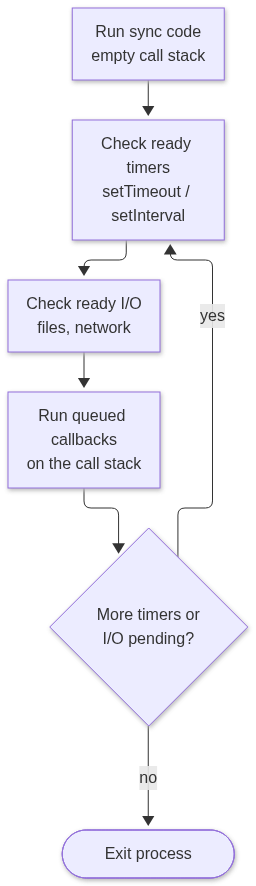
When you call an async function like fs.readFile or setTimeout, the work moves through a repeating cycle:
- Your code calls the async API on the call stack.
- Node.js hands the actual wait (the timer countdown, the file read, the network socket) to the OS or background threads and returns immediately.
- Your remaining synchronous code finishes, emptying the call stack.
- When the background operation completes, its callback is placed in a queue.
- On its next turn, the event loop picks up the queued callback and runs it on the call stack.
- The loop checks again. If nothing is waiting and no timers or handles remain open, Node.js exits.
Timers vs I/O callbacks (high level)
Not every callback waits in the same bucket. At a high level, Node.js checks timers (such as setTimeout and setInterval) and I/O callbacks (such as finished file reads and incoming network data) as separate parts of each cycle.
Here is both running in the same script:
const fs = require("fs");

console.log("start");

setTimeout(() => {
  console.log("timer (50ms)");
}, 50);

fs.readFile("note.txt", "utf8", (err, data) => {
  if (err) throw err;
  console.log("I/O done:", data.trim());
});

console.log("end");
start
end
I/O done: Hello from note.txt
timer (50ms)
Both start and end ran synchronously first. The small local file finished reading well before 50 milliseconds passed, so the I/O callback ran before the timer callback. If the file read had taken 80 milliseconds, the timer would have fired first.
One detail worth keeping in mind: a timer's delay is a minimum wait, not a guaranteed exact timestamp. The callback can only run after the delay has elapsed and the call stack is free.
Why the event loop helps Node.js scale
Traditional multi-threaded servers often assign one OS thread per incoming connection. When thousands of users connect at once and most of them are waiting on a database or an API response, those threads consume memory while sitting idle.
Node.js takes a different approach. One thread accepts request A, starts its database query asynchronously, and immediately accepts request B, C, and D while the database works. Because the thread spends its time running callbacks instead of waiting on I/O, a single Node.js process can juggle many concurrent I/O-heavy requests with low overhead.
That is why Node.js fits web APIs, real-time chat servers, and proxies well: those workloads spend most of their time waiting on networks, databases, and disks, not crunching numbers.
When NOT to rely on the event loop
The single-thread design has a sharp edge: heavy CPU work blocks the event loop for everyone.
Watch what happens to a 50ms timer when a synchronous loop hogs the call stack for 400ms:
// ❌ CPU-heavy synchronous loop blocks every queued callback
const start = Date.now();

setTimeout(() => {
  const elapsed = Date.now() - start;
  console.log(`50ms timer actually ran after ${elapsed}ms`);
}, 50);

// block the single thread for ~400ms
while (Date.now() - start < 400) {}
console.log("blocking loop finished");
blocking loop finished
50ms timer actually ran after 404ms
The timer asked for 50ms and waited 404ms on this machine. The event loop could not run the callback until the while loop finished and cleared the call stack. In a live server, that same block would freeze every other user's request.
Do not run heavy image processing, video encoding, large synchronous JSON parsing, or crypto hashing on the main event loop thread. Offload CPU-bound tasks to Worker Threads, a background job queue, or a separate service.
Where this leaves you
The Node.js event loop lets one JavaScript thread handle many concurrent I/O operations by offloading waits and running callbacks whenever the call stack clears. Keep the main thread free of synchronous waits and CPU-heavy loops, and the loop stays responsive.
One honest limit: I haven't benchmarked how many requests a Node.js process can serve, so the scaling section describes the design, not a measured result. This post also intentionally skipped Node's libuv phases (timers, poll, check), setImmediate, and the microtask queues (Promise.then and process.nextTick), which run between callbacks and change execution order in subtle ways. Which part of async execution tripped you up first — setTimeout(..., 0) running last, or blocking the thread with a heavy loop?
Comments
Join the discussionNo comments yet. Be the first to comment.