Look Left of the Dot: How JavaScript Decides What this Is
The this keyword in the global scope, in objects and in functions, and why the way you call a function decides its value
Here's one function, called two ways:
const user = {
  name: "Asha",
  greet() { console.log("Hi, I'm", this.name); },
};

user.greet();          // Hi, I'm Asha

const greet = user.greet;
greet();               // Hi, I'm undefined
Same function. Same code inside it. Two different results. Nothing about the function changed. What changed is how it was called.
That's the whole secret of this in JavaScript. It isn't decided where a function is written. It's decided each time the function is called, by who called it. Once you know where to look, this stops being mysterious. Every output in this post is real, from Node.js 24.22, plus Chrome 157 for the browser-only parts.
What this represents
Inside a function, this refers to the object the function was called on: its caller. The quickest way to find it is to look at the call and check what's to the left of the dot:
user.greet();   // left of the dot: user  → this is user
greet();        // nothing to the left    → no caller object
That rule, "look left of the dot at the call", handles most code you'll meet. The rest of this post is the rule applied in each context, plus the cases where something overrides it.
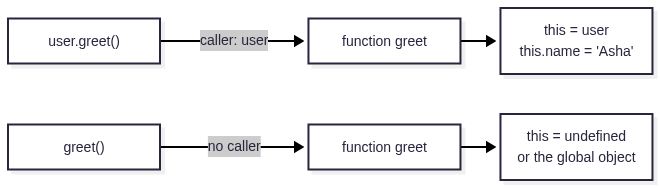
this depending on who called it.
this in the global context
Outside any function, this depends on where the code runs. I checked all three common cases:
| Where the code runs | Top-level this |
|---|---|
A classic <script> in the browser |
window (this === window was true in Chrome) |
A Node.js CommonJS file (.js) |
{}, which is module.exports |
An ES module (.mjs, or <script type="module">) |
undefined |
You'll rarely need top-level this in real code. The point is that even here, there's no single answer; it depends on the context the code was loaded in.
this inside objects
When a function is stored on an object and called through it, it's called a method, and this is that object:
const user = {
  name: "Asha",
  greet() { console.log("Hi, I'm", this.name); },
};
user.greet();
Hi, I'm Asha
The function doesn't belong to user in any permanent way. Attach the same function to another object and call it there:
const ravi = { name: "Ravi" };
ravi.greet = user.greet;
ravi.greet();
Hi, I'm Ravi
Same function; the caller changed, so this changed.
With nested objects, only the object directly left of the dot counts:
const company = {
  name: "Acme",
  ceo: { name: "Meera", whoAmI() { console.log("this.name =", this.name); } },
};
company.ceo.whoAmI();
this.name = Meera
this is company.ceo, not company. Look at the last dot before the call.
this inside plain functions
Call a function with nothing to the left of the dot, and there's no caller object. What you get depends on whether the code is in strict mode:
function sloppy() { return this === globalThis; }
function strict() { "use strict"; return this; }
console.log("sloppy plain call: this === globalThis ->", sloppy());
console.log("strict plain call: this ->", strict());
sloppy plain call: this === globalThis -> true
strict plain call: this -> undefined
In strict mode, this is undefined. In older "sloppy" mode, JavaScript substitutes the global object (window in browsers, globalThis everywhere). ES modules and classes are always strict, so in modern code, expect undefined.
That explains the opening example. greet() had no caller. It ran in a sloppy-mode file, so this was the global object, which has no name property in Node: undefined. In Chrome the same call printed Hi, I'm "", because browsers' window happens to have a name property that's an empty string. That's one more reason to want strict mode: an error is easier to spot than a silently wrong value.
How the calling context changes this
Now the case that causes real bugs: passing a method somewhere else.
setTimeout(user.greet, 0);
Hi, I'm undefined
user.greet without parentheses doesn't call anything. It hands the bare function to setTimeout. When the timer fires, setTimeout calls it, not user, so this isn't user any more. The same thing happens when you pass a method as an event handler or to .map().
Three ways to fix it:
setTimeout(() => user.greet(), 0);   // 1. wrap it: now user is left of the dot
setTimeout(user.greet.bind(user), 0); // 2. bind: a copy with this locked to user
Hi, I'm Asha
Hi, I'm Asha
The third way is to choose this at the moment you call. call and apply both run a function with whatever this you pass; they differ only in how arguments are given:
function introduce(greeting) { console.log(`${greeting}, I'm ${this.name}`); }
introduce.call(ravi, "Hello");
introduce.apply(ravi, ["Namaste"]);
Hello, I'm Ravi
Namaste, I'm Ravi
Arrow functions don't have their own this
Arrow functions are the one big exception to "look left of the dot". They don't get a this of their own; they use the this of the code around them. That makes them wrong for methods:
const arrowUser = { name: "Asha", greet: () => console.log("arrow method, this.name =", this?.name) };
arrowUser.greet();
arrow method, this.name = undefined
The arrow ignores arrowUser and uses the surrounding file's this. But the same behaviour makes arrows exactly right for callbacks inside a method:
const timerUser = {
  name: "Asha",
  later() { setTimeout(() => console.log("arrow inside method:", this.name), 0); },
  laterBroken() { setTimeout(function () { console.log("function inside method:", this?.name); }, 0); },
};
timerUser.later();
timerUser.laterBroken();
arrow inside method: Asha
function inside method: undefined
The arrow borrows later's this, which is timerUser. The regular function gets called by setTimeout, so it loses it. Use regular functions (or method shorthand) for methods, and arrows for callbacks inside them.
One browser-specific case: in an event listener written as a regular function, this is the element the listener is on. In Chrome, button.addEventListener("click", function () { … }) gave this === button as true.
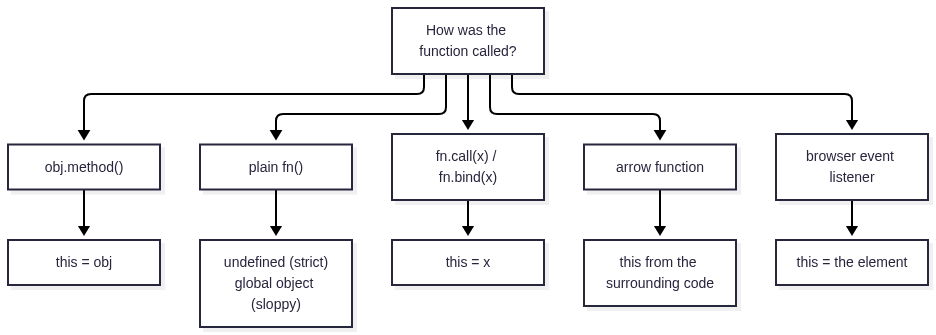
this gets its value.
Here's the same thing as a table to keep:
| Call | this |
|---|---|
user.greet() |
user |
greet() |
undefined in strict mode, global object in sloppy mode |
setTimeout(user.greet, 0) |
not user: the method was passed, not called |
greet.call(ravi) / greet.bind(ravi)() |
ravi |
| arrow function | whatever this is where the arrow was written |
The rule in one line: this is the object a function was called on. Look left of the dot at the call, unless it's an arrow function, which borrows this from where it was written. Most this bugs are a method passed somewhere without its object. This post skipped classes and new, where this is the newly created object; the same "who called it" thinking carries over.
Predict this one before you run it: const { greet } = user; greet();. What does it print, and why?
Comments
Join the discussionNo comments yet. Be the first to comment.




