Why Node Says \"Cannot use import statement outside a module\"
Why JavaScript needs modules, how export and import work, default vs named exports, and how to turn modules on, with real output
You write your first import, run the file, and Node answers:
import { add } from '../math.mjs';
^^^^^^
SyntaxError: Cannot use import statement outside a module
The code is fine. Node is treating the file as an older kind of script, and import only exists in the newer kind: a module. This post covers why modules exist, how export and import work, named vs default exports, and how to switch modules on. Every output is a real run on Node.js 24.22.1, with npm 11.19.1.
What goes wrong with one big file
Put everything in a single file and three things happen as it grows. Names collide. Code gets hard to find. A change in one corner breaks something far away.
The collision is the easiest to see:
// ❌ one file, two totals
const total = 10;
const total = 20;
console.log(total);
SyntaxError: Identifier 'total' has already been declared
In a small file you'd rename one. In a 500-line file with three people editing it, you'd have to know every name already taken. Modules fix this by giving each file its own scope.
What a module is
A module is a file whose top-level variables are private by default. Nothing leaves the file unless you export it, and nothing comes in unless you import it.
// a.mjs
const total = 10;
export const subtotal = total;
// b.mjs
const total = 20;
export const grandTotal = total;
// two.mjs
import { subtotal } from './a.mjs';
import { grandTotal } from './b.mjs';
console.log(subtotal, grandTotal);
10 20
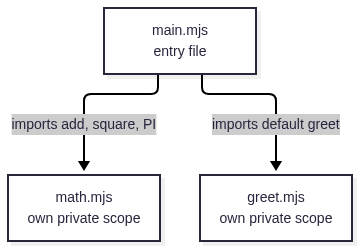
Both files use a variable called total, and neither knows about the other's. Only what was exported crossed the boundary. The files form a dependency graph, with the entry file importing from the others:
Exporting: named exports
A named export shares a value under its own name. You can put export in front of the declaration, and a file can have as many as it needs:
// math.mjs
export const add = (a, b) => a + b;
export const PI = 3.14159;
export function square(n) {
  return n * n;
}
You can also declare normally and export from one place, optionally under a different name:
// ex.mjs
export { x as renamed };
const x = 1;
Anything without export stays private.
Importing: names in braces
An import names exactly what it wants, in curly braces, and the path says where it comes from:
// main.mjs
import { add, square, PI as pi } from './math.mjs';
import * as math from './math.mjs';

console.log(add(2, 3), square(4), pi);
console.log(Object.keys(math));
5 16 3.14159
[ 'PI', 'add', 'square' ]
PI as pi renames on the way in, which helps when two modules export the same name. import * as math collects everything into one object. Keep the ./ and the file extension in the path: './math.mjs', not 'math'.
Default exports: one per file
A default export is the file's main thing. A file can have only one:
// greet.mjs
export default function greet(name) {
  return `Hello, ${name}!`;
}
Import it without braces, and you choose the name:
import greet from './greet.mjs';
import sayHello from './greet.mjs'; // same function, different local name
console.log(greet('Asha'));
Hello, Asha!
Named vs default: the mistake everyone makes
Braces or no braces depends on how the file exported. Get it wrong and the error is clear, but it only shows when the module loads:
// ❌ math.mjs has no default export
import add from './math.mjs';
SyntaxError: The requested module './math.mjs' does not provide an export named 'default'
// ❌ greet.mjs has only a default export
import { greet } from './greet.mjs';
SyntaxError: The requested module './greet.mjs' does not provide an export named 'greet'
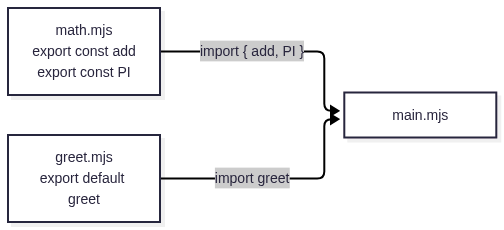
The rule: braces for named exports, no braces for the default. The flow looks like this:
Which should you use? That's partly taste, and I'm giving my opinion here, not a rule. I prefer named exports. They can't be renamed by accident, editors can autocomplete them, and a search for the name finds every use. A default export lets every importer invent a different name for the same thing. A default makes sense when a file really is one thing, such as a single component or class.
How to turn modules on
Node decides whether a file is a module from its extension and the nearest package.json. Two switches work:
- Name the file
.mjs, as above. - Add
"type": "module"topackage.json, then plain.jsfiles are modules.
Here's the surprise behind the error at the top. On npm 11.19.1, npm init -y writes "type": "commonjs" into package.json. I checked. With that in place, import in a .js file fails with the message above. Switch the value to "module" and the same file prints 3.
Node 24.22.1 also tries to detect module syntax when no type is set. A .js file with import and no package.json ran fine, and with a package.json that had no "type" it ran with a warning about reparsing. Turn detection off with --no-experimental-detect-module and the original error returns. I wouldn't rely on detection. State the type explicitly.
In a browser, the equivalent switch is <script type="module" src="main.js"></script>. That's all you need to know there for now, and bundlers are a separate topic I'm leaving out.
What modules buy you
Think about what the split changes for the next person to open the project. To find where add lives, they follow one import to one file instead of searching a long one. To change add, they read one small file and check who imports it. A name they pick can't clash with a name in another file. None of that needs a tool, only the habit of one file, one job.
Two behaviours are worth seeing in output, because they surprise people.
Each module runs once. Importing the same file twice doesn't run it twice:
// logger.mjs
console.log('logger.mjs is running');
export const log = (m) => console.log(m);
// once.mjs
import './logger.mjs';
import { log } from './logger.mjs';
log('hello');
logger.mjs is running
hello
Imports are live and read-only. An imported name is a view of the exporting module's variable, not a copy, and the importer can't assign to it:
// counter.mjs
export let count = 0;
export function inc() { count++; }

// live.mjs
import { count, inc } from './counter.mjs';
console.log(count);
inc();
console.log(count);
try { count = 10; } catch (e) { console.log(e.name + ': ' + e.message); }
0
1
TypeError: Assignment to constant variable.
The exporting module changed count, and the importer saw the new value. Only the owner can change it. That is what makes modular code easier to maintain: every piece of state has one place that's allowed to change it, and one place to look when it's wrong.
When not to split
Don't make a file per function. A 10-line helper that's only used in one place can stay where it is. Splitting adds a path to type, a name to export and a hop to follow when reading, so it needs to buy you something: a reusable piece, a clear owner, or a name collision avoided. A good rough test is whether you can describe the file's job in one short sentence.
Where this leaves you
Use export to publish what other files need, import to name what you use, braces for named exports, none for the default, and set the module type explicitly so Node doesn't guess.
One limit: I haven't covered CommonJS (require), which older Node code still uses, or circular imports, which can leave an import undefined while modules load. One check I did run: require() of an .mjs file worked on Node 24.22.1 and returned the exports, but I haven't tested other versions. Which do you reach for first in a new file: named exports, or a default?
Comments
Join the discussionNo comments yet. Be the first to comment.