map Returns a New Array, push Changes the Old One: Array Methods for Beginners
push, pop, shift, unshift, forEach, map, filter and reduce explained with before-and-after arrays and real output

Run two array methods on the same list and they behave in opposite ways:
const prices = [10, 20, 30];
const doubled = prices.map(p => p * 2);
console.log("after map:", prices, "returned:", doubled);

const newLength = prices.push(40);
console.log("after push:", prices, "returned:", newLength);
after map: [ 10, 20, 30 ] returned: [ 20, 40, 60 ]
after push: [ 10, 20, 30, 40 ] returned: 4
map left prices untouched and handed back a new array. push mutated prices in place and handed back the number 4, not the array. That split — mutating vs returning a new array — is the main thing to track across every array method in JavaScript.
All outputs below come from real runs on Node.js 24.22.1. If you haven't covered indexing and array basics yet, start with JavaScript arrays 101.
One question for every method
Before using any array method, ask two things: does it change the original array, and what does it return?
| Method | Changes original? | Returns |
|---|---|---|
push() |
Yes (adds to end) | New length |
pop() |
Yes (removes from end) | Removed item |
unshift() |
Yes (adds to front) | New length |
shift() |
Yes (removes from front) | Removed item |
forEach() |
No (unless your callback mutates it) | undefined |
map() |
No | New array (same length) |
filter() |
No | New array (matching items only) |
reduce() |
No | One accumulated value |
Keep that table in mind as you try the examples in your browser console or Node REPL.
push() and pop(): work at the end
push appends an item to the end of an array and returns the new length. pop removes the last item and returns the item it took off:
const cart = ["pen", "book"];
console.log("before:", cart);

const len = cart.push("bag");
console.log("after push:", cart, "returned:", len);

const removed = cart.pop();
console.log("after pop:", cart, "returned:", removed);
before: [ 'pen', 'book' ]
after push: [ 'pen', 'book', 'bag' ] returned: 3
after pop: [ 'pen', 'book' ] returned: bag
Both change cart in place. A common mistake is writing const updated = cart.push("bag") expecting updated to be the array. It will be 3.
Try it in the console — call
pop()on an empty array[]and check what it returns.
shift() and unshift(): work at the front
unshift adds an item to index 0 and returns the new length. shift removes index 0 and returns the removed item:
const queue = ["Asha", "Ravi"];
console.log("before:", queue);

const len = queue.unshift("Meera");
console.log("after unshift:", queue, "returned:", len);

const first = queue.shift();
console.log("after shift:", queue, "returned:", first);
before: [ 'Asha', 'Ravi' ]
after unshift: [ 'Meera', 'Asha', 'Ravi' ] returned: 3
after shift: [ 'Asha', 'Ravi' ] returned: Meera
Notice the hidden cost. Adding or removing at the end touches one slot. Adding or removing at index 0 shifts every remaining item along by one. For a small list of five names you won't notice. I timed emptying a 50,000-item array in a loop on this machine (Node.js 24.22.1, two runs): shift took about 1.5 to 2.4 seconds and pop took under a millisecond. Treat that as one machine's result, not a benchmark, but the gap is large.
Try it in the console — pass two arguments to
queue.unshift("Kiran", "Dev")and check their order in the resulting array.
forEach(): run a callback, return nothing
forEach runs a function once for every item. It is for side effects such as logging, updating the DOM, or saving records. It does not build a new array:
// ❌ expecting forEach to return a new array
const nums = [1, 2, 3];
const doubled = nums.forEach(n => n * 2);
console.log(doubled);
undefined
Because forEach always returns undefined, assigning its result to a variable is a bug. Use it when you want an action per item, not a transformed list:
// ✅ side effect only
const nums = [1, 2, 3];
const result = nums.forEach(n => {
  console.log("item:", n);
});
console.log("returned:", result);
console.log("original:", nums);
item: 1
item: 2
item: 3
returned: undefined
original: [ 1, 2, 3 ]
Try it in the console — add a second parameter
(n, index)to theforEachcallback and print both.
map(): transform every item into a new array
map runs your callback on every item and collects the return values into a new array of the same length. Compare a traditional for loop against map when taking 50 off every price:
const prices = [100, 250, 400];

// for loop
const discountedLoop = [];
for (let i = 0; i < prices.length; i++) {
  discountedLoop.push(prices[i] - 50);
}

// map
const discountedMap = prices.map(p => p - 50);

console.log("before:", prices);
console.log("loop:", discountedLoop);
console.log("map:", discountedMap);
before: [ 100, 250, 400 ]
loop: [ 50, 200, 350 ]
map: [ 50, 200, 350 ]
Both produce the exact same array, and prices stays [ 100, 250, 400 ]. The for loop spends four lines on plumbing (an empty array, an index counter, a push). map states the transformation in one line.

Try it in the console — use
mapon["asha", "ravi"]to return uppercase names.
filter(): keep only the items that pass a test
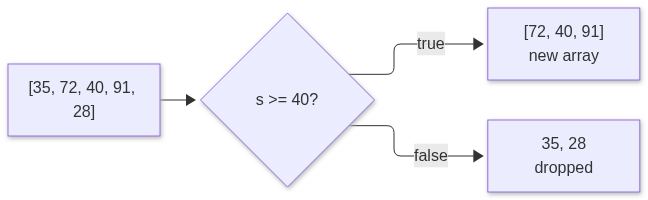
filter runs a callback that returns true or false. Items where it returns true go into the new array; the rest are dropped. Compare a for loop against filter for keeping passing scores (40 or above):
const scores = [35, 72, 40, 91, 28];

// for loop
const passedLoop = [];
for (let i = 0; i < scores.length; i++) {
  if (scores[i] >= 40) {
    passedLoop.push(scores[i]);
  }
}

// filter
const passedFilter = scores.filter(s => s >= 40);

console.log("before:", scores);
console.log("loop:", passedLoop);
console.log("filter:", passedFilter);
before: [ 35, 72, 40, 91, 28 ]
loop: [ 72, 40, 91 ]
filter: [ 72, 40, 91 ]
The original scores array is untouched, and the new array is shorter. Unlike map, filter never modifies the values — it only decides which ones survive.
Try it in the console — filter
scoresfor numbers below 40, then checkscores.lengthto confirm the original didn't shrink.
reduce(): fold an array into a single value
reduce walks through the array while carrying a running value called the accumulator. On each step, your callback receives the current accumulator and the next item, and whatever you return becomes the accumulator for the next step.
The second argument to reduce is the starting value (here, 0):
const expenses = [120, 45, 80, 55];
const total = expenses.reduce((sum, amount) => {
  console.log(`sum=${sum}, amount=${amount} -> ${sum + amount}`);
  return sum + amount;
}, 0);
console.log("total:", total);
console.log("original:", expenses);
sum=0, amount=120 -> 120
sum=120, amount=45 -> 165
sum=165, amount=80 -> 245
sum=245, amount=55 -> 300
total: 300
original: [ 120, 45, 80, 55 ]

Always pass the initial value (0 for a sum). Without it, calling reduce on an empty array throws:
try {
  [].reduce((sum, n) => sum + n);
} catch (e) {
  console.log(e.name + ": " + e.message);
}
console.log([].reduce((sum, n) => sum + n, 0));
TypeError: Reduce of empty array with no initial value
0
Try it in the console — change the initial value from
0to100in theexpensesexample and trace the first step.
When not to use each method
Every method here has a misuse that trips people up:
- Don't use
mapwhen you ignore its return value. If you aren't storing or returning the new array, you built an array for nothing. UseforEachor afor...ofloop. - Don't use
forEachwhen you need to stop early.breakis a syntax error inside a callback, andreturnonly skips the current item. Use a plainfororfor...ofloop if you need to exit mid-way. - Don't use
reducewhenmaporfiltersays it better. You can rebuildmapandfilterwithreduce, and it almost always reads worse. Keepreducefor folding into one result (a sum, a count, a grouped object). - Don't use
shiftin a tight loop on large arrays. Re-indexing on every iteration adds up.
The assignment, solved step by step
Start with an array of numbers, double each one with map, keep those greater than 10 with filter, and sum the survivors with reduce. Each step sits in its own variable so you can inspect the intermediate arrays before learning to chain them:
const numbers = [3, 6, 8, 2, 12];

const doubled = numbers.map(n => n * 2);
console.log("doubled:", doubled);

const aboveTen = doubled.filter(n => n > 10);
console.log("above 10:", aboveTen);

const total = aboveTen.reduce((sum, n) => sum + n, 0);
console.log("sum:", total);
console.log("original:", numbers);
doubled: [ 6, 12, 16, 4, 24 ]
above 10: [ 12, 16, 24 ]
sum: 52
original: [ 3, 6, 8, 2, 12 ]
Step by step: [3, 6, 8, 2, 12] doubles to [6, 12, 16, 4, 24]. Filtering for n > 10 drops 6 and 4, leaving [12, 16, 24]. Summing from 0 gives 52, and numbers is still intact at the end.
Where this leaves you
Track two things for every array method: whether it mutates the original array (push, pop, shift, unshift do; map, filter, reduce don't) and what it returns. That single habit prevents most beginner array bugs.
One limit: this post leaves out method chaining (numbers.map(...).filter(...).reduce(...)) and search methods like find, some and every, and I haven't benchmarked for loops against map or filter. Which of these methods tripped you up first — forEach returning undefined, or push returning the new length?
Comments
Join the discussionNo comments yet. Be the first to comment.