Git Doesn't Store Diffs: A Look Inside the .git Folder
Blobs, trees and commits, what git add and git commit really write, and how hashes keep your history honest
Ask how Git saves a commit and most people say it stores what changed. That sounds right: git diff shows changes, pull requests show changes. Then you ask Git to print a commit, and there's no diff in it anywhere:
git cat-file -p aa324ec
tree 1c9f2a0bc07101a9b557ad9fabf9a6f9719373c1
author Your Name <you@example.com> 1795408200 +0530
committer Your Name <you@example.com> 1795408200 +0530

Add homepage
The commit points at a tree: a snapshot of every file in the project. Diffs are something Git calculates when you ask for one. Once that clicks, how Git works internally gets a lot less mysterious. This post opens the .git folder, walks through the three object types, shows what git add and git commit actually write, and how hashes keep history honest. Every output below comes from a real run of Git 2.56 on a throwaway repository.
The .git folder is the repository
Run git init in an empty folder and look inside the hidden folder it creates:
git init
ls -1F .git
HEAD
config
description
hooks/
info/
objects/
refs/
The parts that matter:
objects/: the database. Every version of every file, every directory listing, every commit.refs/: branch and tag names.refs/heads/mainis a small text file holding one commit hash.HEAD: which branch you're on. Right now it containsref: refs/heads/main.config: settings for this repository only.hooks/,info/,description: scripts and extras you can ignore for now.
Two more appear later: index (the staging area) shows up on your first git add, and logs/ on your first commit.
Your project folder holds the files you edit. The .git folder holds everything Git knows: history, branches, staged changes. Delete .git and your files are still there, but as far as Git is concerned the project never had a history.
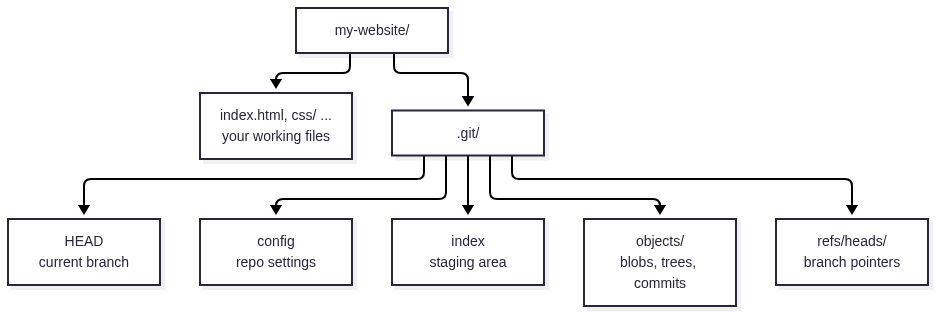
.git; everything Git knows lives inside it.
Every object is named by its contents
The objects/ folder is a key-value store. You hand Git some content, and it hands back a key: the SHA-1 hash of that content.
echo "hello" | git hash-object --stdin
ce013625030ba8dba906f756967f9e9ca394464a
Run that again, on any machine, and you get the same 40 characters. Git didn't choose the name. It computed it. This is called content-addressable storage: the address of a thing is derived from the thing itself.
What gets hashed is a short header plus the content: the object type, the size in bytes, a null byte, then the bytes. You can reproduce Git's hash without Git:
printf 'blob 6\0hello\n' | sha1sum
ce013625030ba8dba906f756967f9e9ca394464a -
Same hash. On disk, Git zlib-compresses that header-plus-content and stores it under the hash: the first two characters become a folder, the remaining 38 the filename. That's why you see paths like .git/objects/98/6a4a1a25bc4928e95d7e0d6cfa67d9a9c7a808.
The three objects: blob, tree, commit
Almost everything in objects/ is one of three types. (Annotated tags are a fourth; this post skips them.) git cat-file -t tells you an object's type, and -p prints it. The commit at the top of this post pointed at tree 1c9f2a0, so follow it down:
git cat-file -p 1c9f2a0 # the tree
100644 blob 986a4a1a25bc4928e95d7e0d6cfa67d9a9c7a808 index.html
git cat-file -p 986a4a1 # the blob
<h1>Hello</h1>
- Blob: the raw contents of a file. No filename, no permissions, no date. When I copied
index.htmltoabout.htmland staged it, both entries pointed at the same blob,986a4a1, and no new object was written. Same content, same hash, stored once. - Tree: a directory listing. Each line is a mode, a type, a hash and a name. A subdirectory is another tree.
- Commit: one tree (the whole project at that moment), the parent commit, author, committer, and message. The first commit has no parent line; later ones do.
After a second commit that added css/style.css, the root tree looks like this:
040000 tree 503c214e2f037b83090dc6b17befb85e08cd9851	css
100644 blob 986a4a1a25bc4928e95d7e0d6cfa67d9a9c7a808	index.html
Notice index.html still points at 986a4a1. Nothing about it changed, so the new snapshot reuses the old blob.
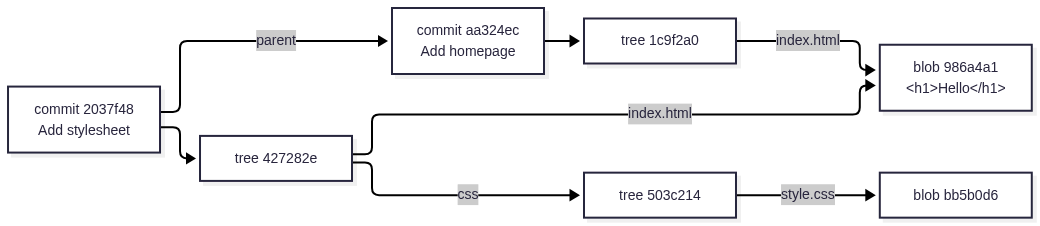
index.html blob; only the new file adds objects.
What git add actually writes
Before staging, my fresh repository had zero objects and no index file. Then:
echo "<h1>Hello</h1>" > index.html
git add index.html
find .git/objects -type f
git ls-files --stage
.git/objects/98/6a4a1a25bc4928e95d7e0d6cfa67d9a9c7a808
100644 986a4a1a25bc4928e95d7e0d6cfa67d9a9c7a808 0	index.html
So git add does two things. It writes the blob into the database right away, and it records "index.html → 986a4a1" in .git/index. No commit exists yet, but the content is already saved inside Git. Staging isn't a to-do list; it's the next snapshot, being built one file at a time.
What git commit actually writes
After git commit -m "Add homepage", the database held three objects:
.git/objects/1c/9f2a0bc07101a9b557ad9fabf9a6f9719373c1   ← tree
.git/objects/98/6a4a1a25bc4928e95d7e0d6cfa67d9a9c7a808   ← blob (from git add)
.git/objects/aa/324ec0746653204f26b4aa9834f06ddbcd57af   ← commit
The commit did three things:
- Built tree objects from the index:
1c9f2a0. - Wrote a commit object pointing at that tree, with the current commit as its parent (none, here).
- Moved the branch.
.git/refs/heads/mainnow containsaa324ec0746653204f26b4aa9834f06ddbcd57af.HEADstill saysref: refs/heads/main, so it follows along.
That last step is the whole secret of branches: a branch is a file containing one commit hash. Creating a branch writes one small file, which is why branches are so cheap to make.

git add already writes to the database; git commit adds the tree, the commit, and moves the branch.
How Git tracks changes without storing changes
Here's what each commit added to the database in my demo:
| Commit | What I did | New objects | Reused |
|---|---|---|---|
aa324ec |
added index.html |
blob, tree, commit | none |
2037f48 |
added css/style.css |
blob, css tree, root tree, commit |
index.html blob |
b42dd8c |
edited index.html |
blob, root tree, commit | whole css tree |
Ten objects for three commits. Every commit is a full snapshot, but unchanged files and folders are shared by hash, so a snapshot costs only what's new.
"What changed" is then a comparison of two trees. Where two hashes match, the contents match, and Git can skip that whole subtree without opening it. Where they differ, Git reads both versions and computes the diff on the spot:
git diff --stat HEAD~2 HEAD~1
 css/style.css | 1 +
 1 file changed, 1 insertion(+)
The same idea explains renames. Git doesn't record "renamed". It sees a path disappear and a similar file appear, and works the rename out when it diffs.
Hashes make history tamper-evident
A commit's hash covers its tree's hash and its parent's hash. Change one byte in an old file and its blob hash changes, which changes the tree, which changes that commit and every commit after it. You can't quietly edit history; you can only make different history with different hashes.
To see the check, I overwrote the object file for 986a4a1 with different content, in a throwaway copy of the repository:
git fsck
error: 070a58da24235a5e3aad1cd0ceb9e4fab6b30137: hash-path mismatch, found at: .git/objects/98/6a4a1a25bc4928e95d7e0d6cfa67d9a9c7a808
missing blob 986a4a1a25bc4928e95d7e0d6cfa67d9a9c7a808
The file no longer hashes to its own name, and git fsck says so. One caveat from the same experiment: git cat-file -p 986a4a1 printed the tampered content without complaint. Everyday reads don't re-verify every object; git fsck is the command that does.
Where the simple model leaks
Git does store deltas, eventually. One file per object ("loose objects") is how new objects start. git gc, which Git also runs automatically from time to time, packs them into a packfile, where an object can be stored as a delta against a similar one. After git gc on my demo repo, git count-objects -v reported count: 0 and in-pack: 10. The refs moved too: refs/heads/main became a line in .git/packed-refs. Deltas here are a compression detail; every command still hands you full snapshots. The Packfiles chapter of Pro Git covers the details.
SHA-1 isn't the end of the story. A default repository in Git 2.56 still uses 40-character SHA-1 hashes. Git can also create SHA-256 repositories: git init --object-format=sha256 worked in 2.56 and gave 64-character hashes. Whether your hosting and tools support that format is something to check before switching; I haven't tested it against a host. The hash function transition document explains the plan.
Don't edit .git by hand. The tampering above is what hand-editing looks like from Git's side. Read the internals with plumbing commands (git cat-file, git ls-files --stage, git rev-parse) and change them only with normal Git commands.
You also don't need any of this to use Git day to day. It pays off when something looks wrong: a "lost" commit, a detached HEAD, a branch that seems to point at the wrong place. Each of those is a name pointing at a hash, and now you can look at the hashes.
The model in one line: Git stores snapshots as objects named by their hashes, and branches are names that point at commits. This post skipped annotated tags, the reflog and how packfiles choose their deltas; each builds on the same objects. If you want the commands first, start with Git for Beginners.
Run git cat-file -p HEAD in a repository you work on. How many parent lines does it have, and what kind of commit has two?
Comments
Join the discussionNo comments yet. Be the first to comment.




