Forget next() and Your Express Request Hangs Forever
How Express.js middleware works: request pipeline, execution order, types, next(), and logging, auth, and validation
Write your first Express.js middleware, send a request, and the browser tab spins forever with zero errors in the terminal:
// ❌ logs the request, then never hands off control
const express = require("express");
const app = express();

app.use((req, res, next) => {
  console.log("logged:", req.method, req.url);
  // missing next() or res.send()
});

app.get("/ping", (req, res) => res.send("pong"));
logged: GET /ping
client error: TimeoutError: The operation was aborted due to timeout
Express did not crash. It waited for your middleware to either send a response or call next(). That single rule is the key to understanding Express.js middleware. Every output below comes from a real run on Node.js 24.22.1 and Express 5.3.0. Lines such as response: 200 hi, client error: ... or /public -> ... are what a small test client printed using Node's built-in fetch; the other lines are server logs.
What middleware is: a checkpoint in the request pipeline
Picture an airport security line between the entrance and your boarding gate. Before you reach the gate, you pass through checkpoints: one checks your boarding pass, another scans your bag, another checks your ID. Any checkpoint can wave you forward — or stop you right there if something is wrong.
In Express.js, an HTTP request travels through a request pipeline from the moment it arrives until a response goes back. Middleware is a function sitting at a checkpoint in that pipeline, with access to three arguments:
function myMiddleware(req, res, next) {
  // inspect or modify req / res, then call next() or end the response
}
req— the incoming request (URL, headers, parsed JSON body).res— the outgoing response (status code, headers, body).next— a function that hands control to the next checkpoint in line.

A middleware function can do four things: run code, modify req or res (for example, attaching req.user), end the request-response cycle early (res.status(401).json(...)), or call next() to pass control forward.
The role of next()
Every middleware must make one of two choices: end the response or call next().
If it does neither, the request hangs until the client times out, as you saw at the top. If it sends a response and forgets return before next(), Express keeps running the next handler and tries to write headers twice, which triggers an error (ERR_HTTP_HEADERS_SENT). Always write return res.status(401).json(...) when stopping early so nothing after it runs.
Two extra habits with next() show up in almost every Express codebase:
- Passing data forward: a middleware can attach properties to
req— for example,req.user = { id: 7 }inside an auth check — and every downstream middleware and route handler can readreq.user. - Forwarding errors: calling
next(err)with an error argument skips all remaining regular middleware and jumps straight to Express's error handler. Callingnext()with no arguments continues down the normal pipeline. In Express 5.3.0, if anasyncmiddleware throws or returns a rejected Promise, Express automatically forwards that rejection to the error handler too.
Execution order: top to bottom
Express runs middleware strictly in the order you register it in your file. A middleware registered after a route that already sent a response will never run for that route:
const express = require("express");
const app = express();

app.use((req, res, next) => { console.log("1. first middleware"); next(); });
app.use((req, res, next) => { console.log("2. second middleware"); next(); });
app.get("/hello", (req, res) => { console.log("3. route handler"); res.send("hi"); });
app.use((req, res, next) => { console.log("4. after route (never runs)"); next(); });
1. first middleware
2. second middleware
3. route handler
response: 200 hi
That top-to-bottom order is why app.use(express.json()) must be registered before your POST and PUT routes. Put it after them and req.body is still undefined when your route runs. The same rule applies to path prefixes: app.use("/api", logger) runs only for URLs starting with /api, and still respects its top-to-bottom position relative to routes under /api.
Three types of middleware
1. Application-level middleware
Attached directly to app with app.use() or app.get()/app.post(). It runs on every incoming request (or every request matching a path prefix like app.use("/api", logger)).
2. Router-level middleware
Attached to an express.Router() instance so it only runs for one group of routes. Public endpoints stay untouched:
const express = require("express");
const app = express();
const adminRouter = express.Router();

adminRouter.use((req, res, next) => {
  console.log("admin guard ran for:", req.originalUrl);
  next();
});
adminRouter.get("/stats", (req, res) => res.json({ activeUsers: 42 }));

app.use("/admin", adminRouter);
app.get("/public", (req, res) => res.json({ status: "open" }));
/public -> {"status":"open"}
admin guard ran for: /admin/stats
/admin/stats -> {"activeUsers":42}
/public bypassed the admin guard completely; /admin/stats passed through it first.
3. Built-in middleware
Express 5.3.0 ships several built-in middleware functions. These three are the ones you will use in most projects (express.raw() and express.text() also exist, for raw and plain-text request bodies):
express.json()— parses incoming JSON request bodies intoreq.body.express.urlencoded({ extended: true })— parses HTML form submissions.express.static("public")— serves static files (HTML, CSS, images) from a folder.
You will also see third-party middleware packages such as cors (cross-origin headers) and helmet (security headers) plugged in the exact same way via app.use(...). Here is how the three core types compare at a glance:
| Type | Registered on | Scope | Typical use |
|---|---|---|---|
| Application-level | app.use(...) |
Every request (or path prefix) | Request logging, global headers |
| Router-level | router.use(...) |
Only routes on that router | Auth guards for /admin or /api |
| Built-in | app.use(express.json()) |
Wherever mounted | Body parsing, serving static files |
Real-world chain: logging, auth, and validation
Here is how three real checkpoints stack in front of a POST /orders route. Logging runs globally via app.use; authentication and validation run on /orders before the route handler:
const express = require("express");
const app = express();
app.use(express.json());

function logger(req, res, next) {
  console.log(`[LOG] ${req.method} ${req.url}`);
  next();
}

function requireAuth(req, res, next) {
  // Local demo only: never hardcode secrets in production code
  if (req.headers["x-api-key"] !== "secret-123") {
    return res.status(401).json({ error: "Missing or invalid API key" });
  }
  next();
}

function validateOrder(req, res, next) {
  const { item } = req.body || {};
  if (typeof item !== "string" || !item.trim()) {
    return res.status(400).json({ error: "item must be a non-empty string" });
  }
  next();
}

app.use(logger);
app.post("/orders", requireAuth, validateOrder, (req, res) => {
  res.status(201).json({ created: { item: req.body.item.trim() } });
});

app.listen(3000, () => console.log("Listening on http://127.0.0.1:3000"));
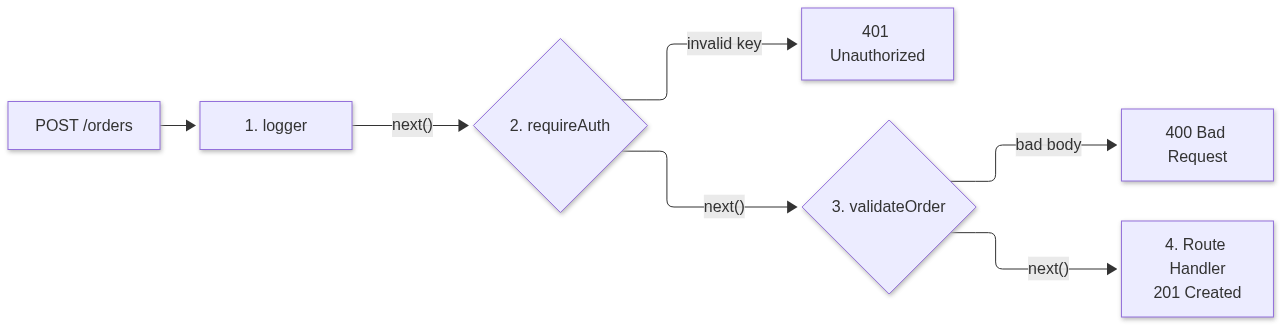
Running three POST /orders requests against this server on Node.js 24.22.1 and Express 5.3.0 produced:
[LOG] POST /orders
no key -> 401 {"error":"Missing or invalid API key"}
[LOG] POST /orders
bad body -> 400 {"error":"item must be a non-empty string"}
[LOG] POST /orders
valid -> 201 {"created":{"item":"Book"}}
Look at how clean the route handler stays. By the time (req, res) runs on POST /orders, it already knows the request was logged, authenticated, and validated. Note on the auth snippet: hardcoding "secret-123" is for a local demo only — in real applications, load secrets from environment variables and use signed tokens or session auth with constant-time comparison.
When NOT to put logic in global middleware
Global app.use(...) runs on every single request, including /health checks and static assets. Avoid putting these there:
- Route-specific business logic: calculating discounts or sending order emails belongs in a controller or service, not a global middleware.
- Auth on public routes: mount
requireAuthon a protected router (app.use("/orders", requireAuth, ordersRouter)) rather than globally, or you will lock out/loginand/health. - Heavy database lookups on every request: fetching a full user profile in global middleware adds latency to routes that never read
req.user.
Where this leaves you
Middleware in Express.js is a sequence of (req, res, next) checkpoints executed from top to bottom. Keep each middleware focused on one cross-cutting job (logging, parsing, auth, validation), register them in order, and make sure every path either sends a response or calls next().
One honest limit: this post skipped writing custom four-argument error-handling middleware (err, req, res, next) and Express's internal router stack to stay focused on the request flow. Which middleware bug bit you first — forgetting next(), registering express.json() after your routes, or forgetting return on an early res.status()?
Comments
Join the discussionNo comments yet. Be the first to comment.




