'use client' doesn't mean client-only — it marks where JS ships
The module-graph boundary behind Server Components, and why it explains most of what Next.js does
Put 'use client' at the top of a file and it's easy to read it as "this component runs in the browser." It doesn't say that. On a full page load, Next.js still renders that component to HTML on the server, sends the HTML as a non-interactive preview, then sends the component's JavaScript and hydrates it — the Next.js docs describe exactly this sequence.
What the directive actually marks is a boundary in your module graph. Everything imported below it joins the client bundle. That's it.
I'm writing this from the Next.js and React documentation rather than from a specific incident, and I'll flag which parts are documented behaviour and which are my reading of it. Versions: Next.js 16.3 (16.3.3 is the current Active LTS after the 25 August 2026 security release; 15.5.24 is Maintenance LTS) on React 19.2.
Once that boundary is the thing you're looking at, most of the "why Next.js" questions answer themselves — routing, data fetching, bundle size, and the caching model are all consequences of where the line sits.
What React deliberately doesn't decide
React gives you a component model and two renderers. It does not give you a router, a server, a build pipeline, or an opinion about which code runs where. That was a feature for a decade.
A plain React SPA — say Vite plus React Router — resolves to one shape at runtime: an empty HTML shell, a bundle, then a fetch. The consequences are structural, not accidental:
Content appears only after the JS parses and the data request returns. Two serial round trips before first meaningful paint.
Every feature you add is downloaded by everyone, including users who never open that route.
Data fetching lives in effects, which makes waterfalls the default shape: parent fetches, renders child, child fetches.
React Server Components are React's answer, and this is the part people miss: RSC is a React feature that a framework has to implement. It needs bundler integration to split the module graph and a server to run the server half. The React docs point you at a framework for exactly this reason. Next.js didn't invent Server Components; it shipped the machinery they need to exist. That's the honest version of "framework vs library."
The smallest model that stays true: two module graphs
Every component in the App Router belongs to one of two graphs.
The server graph is the default. Those components run once, during the render, on the server. Their code never reaches the browser. Their output is serialized into the RSC Payload — a compact description of the rendered tree that carries placeholders where Client Components go, plus any props passed across.
The client graph starts at a file with 'use client'. Those components are rendered on the server for the initial HTML and shipped to the browser and hydrated.
Two rules decide what crosses:
Code crosses through imports. Mark one file, and every module it imports joins the client bundle. The docs are explicit that you don't repeat the directive in children — the boundary is inherited.
Data crosses through serializable props. Strings, numbers, plain objects, arrays. Not functions, not class instances. (Server Actions are the sanctioned exception: they cross as a reference, not as code.)
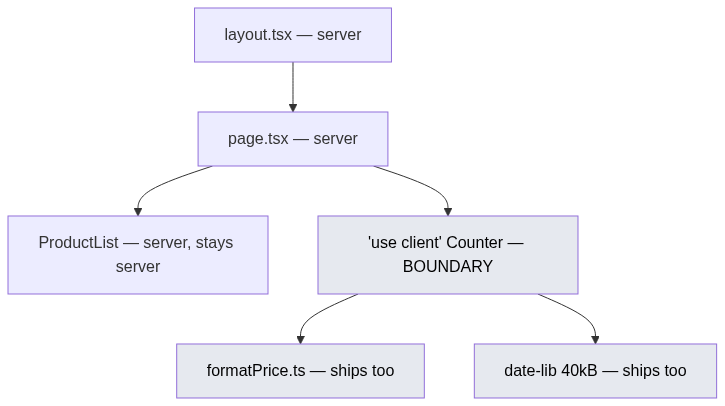
The shaded nodes are the client bundle. Note that date-lib shipped because Counter imported it — not because anyone decided it should.
That second rule is where bundle size quietly goes wrong. A utility file imported by one Client Component is now in the browser, along with everything it imports.
What one request actually does
The file system builds the tree first. A folder is a route segment, page.tsx makes it addressable, layout.tsx wraps everything below it, and [id] makes the segment dynamic:
app/
  layout.tsx              # wraps every route
  page.tsx                # /
  dashboard/
    layout.tsx            # wraps /dashboard/*  — nests inside the root layout
    page.tsx              # /dashboard
    [projectId]/page.tsx  # /dashboard/abc123
Layouts nest rather than replace, and they preserve state across navigations between their children. Navigate from /dashboard to /dashboard/abc123 and the dashboard layout doesn't re-render — its scroll position and any client state inside it survive. That's the part hand-rolled layout components in an SPA usually get wrong.
Then the request runs:
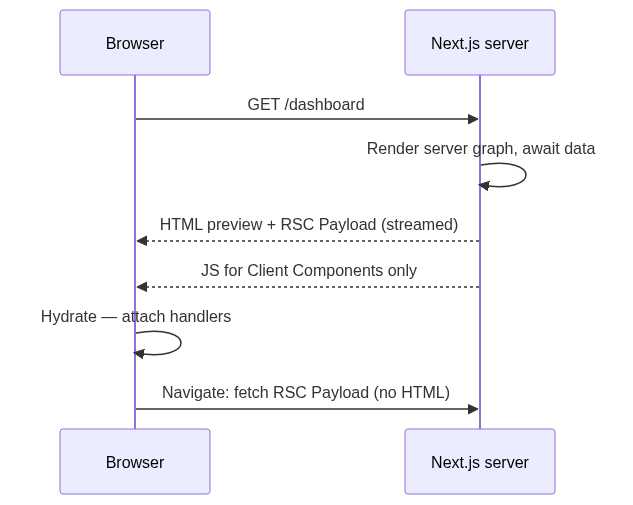
Two details worth holding on to. The HTML is produced from both graphs — Client Components included, which is the opening misconception again. And subsequent navigations fetch an RSC Payload rather than a document, so the server graph re-runs without a full page load.
Rendering strategies are outcomes, not settings
CSR, SSR, SSG and ISR get taught as four modes you pick between. In the App Router they're closer to results the framework infers per route, from what your code touched.
Touch nothing request-specific and the route is prerendered at build time — that's SSG. Read cookies(), headers(), or searchParams, and the route becomes dynamic, rendered per request. Set revalidate and you get ISR: served from a cached prerender, regenerated in the background after the window expires. The unit is the route, not the app, so one app can hold all three.
Warning — This is the area of Next.js that has moved the most, so version-pin anything you read about it. Next.js 15 changed
fetchto be uncached by default. Next.js 16 folded Dynamic IO,use cacheand Partial Pre-Rendering into Cache Components, opt-in viaexperimental.cacheComponents, and dropped the oldexperimental.pprflag. A 2023 blog post about the App Router caching model is describing a different framework.
Data fetching moves above the boundary
The SPA shape, which works and has a cost:
// ❌ Client: two serial round trips, and the token is in the bundle
'use client';
export default function Invoices() {
  const [data, setData] = useState(null);
  useEffect(() => {
    fetch('/api/invoices').then(r => r.json()).then(setData);
  }, []);
  if (!data) return <Spinner />;
  return <Table rows={data} />;
}
The same thing as a Server Component:
// ✅ app/invoices/page.tsx — awaits during the render, ships no fetch logic
export default async function Invoices() {
  const rows = await db.invoice.findMany({ take: 50 }); // driver stays server-side
  return <Table rows={rows} />;
}
There's no loading state because there's no client-side wait — the HTML arrives with the rows in it. The database driver, the query, and the credentials never enter the client graph. <Table> can stay a Server Component too, unless it needs a click handler.
The cost: the render now blocks on your slowest query. Wrap the slow part in <Suspense> and stream it, or you've traded a spinner for a blank tab.
Where the simple model breaks
'use client' is contagious through imports, not through children. This is the single most useful correction, and it's why a root-level provider doesn't turn your app into an SPA:
// app/layout.tsx — still a Server Component
export default function RootLayout({ children }: { children: React.ReactNode }) {
  return (
    <html><body>
      <ThemeProvider>{children}</ThemeProvider>   {/* provider is client */}
    </body></html>
  );
}
ThemeProvider carries 'use client', but children was created in the layout — the server graph. React renders it on the server and drops the output into a hole in the client tree. Import the same component inside the provider's file instead, and it crosses into the client bundle. Same component, same tree position, different graph, entirely because of how it got there.
Client Components still render on the server, so browser globals still explode. window is not defined during a build is the misconception in the title, cashing out. Guard with an effect or a dynamic import with ssr: false.
Serialization is a real constraint. A Date or a plain object crosses fine; a function or a class instance does not. Passing onClick down from a Server Component is a compile error, not a runtime surprise — which is the boundary doing its job.
The boundary is a trust boundary. Anything in the server graph stays server-side, including secrets read from process.env. But that guarantee is about the graph, not the file — export a config object holding an API key from a module that a Client Component imports, and it ships. Use the server-only package to make that a build failure rather than a code review. Also keep patched: Next.js shipped a critical-severity security release on 25 August 2026 covering 16.3 and 15.5, and image optimization has been the source of more than one advisory.
When it's worth it, and when it isn't
The framework earns its complexity when the boundary has something to decide. My reading, stated as a recommendation rather than a measurement:
| Situation | Next.js | Plain React (Vite) |
|---|---|---|
| Public content, SEO matters | Yes — HTML arrives populated | Needs a prerender step you build yourself |
| Behind a login, no crawler | Rarely worth it | Fine, and simpler |
| Heavy data, many routes | Yes — per-route strategy | One bundle for everyone |
| Deploy target is a static bucket or an embedded widget | Awkward | Yes |
| Small team, no capacity to track caching changes | No | Yes |
E-commerce, marketing sites, docs, content-heavy SaaS: the case is easy, because those routes are mostly static with dynamic islands, which is the exact shape Cache Components targets. Internal dashboards, admin panels, and canvas-style apps where everything is interactive and gated: you'd be paying for a server render whose output nobody indexes, plus a caching model you now have to reason about on every PR.
There's a second cost nobody puts in the comparison table. The App Router's rules — which graph a file lands in, what's serializable, what makes a route dynamic — are learnable in an afternoon and forgettable in a week. Reviewers have to catch a stray 'use client' that pulled a charting library into the bundle. That's a team cost, and it's real.
The thing worth keeping: 'use client' is a boundary in your module graph, not a location. Read it as "the client bundle starts here" and the bundle-size surprises, the serialization errors, and the window is not defined builds all stop being surprises.
The limitation of everything above is that it's the documented model, not a profile. I can tell you which code ships and which doesn't; I can't tell you what that's worth on your routes, and the honest answer for a small dashboard may well be "not much." The caching layer in particular is moving fast enough that anything I write here has a shelf life measured in minor versions.
So: has anyone here enabled experimental.cacheComponents on a real app and measured it against the 15-style caching, rather than against a fully dynamic baseline? That's the comparison I keep looking for and not finding.