# Why express.json() Leaves Uploaded Files Empty: Multer Explained
Send an image from a form to an Express route that only uses `express.json()`, and your server sees nothing:
```js
// ❌ express.json() ignores multipart/form-data uploads
const express = require("express");
const app = express();
app.use(express.json());
app.post("/upload", (req, res) => {
res.json({ body: req.body, file: req.file });
});
```
```text
200 {}
```
Both `req.body` and `req.file` were `undefined` (so `res.json` dropped both keys and returned `{}`). Express did not fail — it saw a content type that `express.json()` does not parse. File uploads arrive as **`multipart/form-data`**, and parsing them in Express requires dedicated middleware: **Multer**.
Every output below comes from a real run on **Node.js 24.22.1**, **Express 5.3.0**, and **Multer 2.5.0**.
## Why file uploads need Multer (and what multipart/form-data is)
When a client sends JSON (`application/json`), the entire request body is one plain-text string. Binary files like PNGs or PDFs do not fit cleanly inside JSON without bloated base64 encoding.
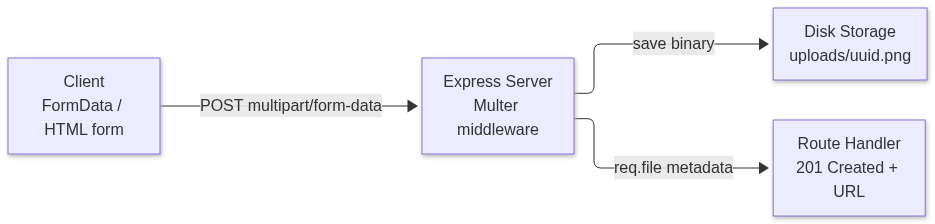
Instead, browsers and `FormData` send file uploads using `Content-Type: multipart/form-data`. That format splits the request body into separate **parts** separated by a boundary string — one part for each text field and one raw binary part for each file, along with its filename and MIME type.
**Multer** is Express middleware built specifically for `multipart/form-data`. It reads the incoming binary stream, saves the file to your chosen storage (disk or memory), puts text fields on `req.body`, and attaches file metadata to `req.file` (for one file) or `req.files` (for several).
## Minimal storage configuration with diskStorage
Install both packages (`npm install express multer`), create an `uploads/` folder (or create it at startup with `fs.mkdirSync`), and configure `multer.diskStorage`:
```js
// upload.js (Node.js 24.22.1, Express 5.3.0, Multer 2.5.0)
const fs = require("fs");
const path = require("path");
const crypto = require("crypto");
const multer = require("multer");
const uploadDir = path.join(__dirname, "uploads");
fs.mkdirSync(uploadDir, { recursive: true });
const mimeToExt = { "image/png": ".png", "image/jpeg": ".jpg", "text/plain": ".txt" };
const storage = multer.diskStorage({
destination: (req, file, cb) => cb(null, uploadDir),
filename: (req, file, cb) => {
const ext = mimeToExt[file.mimetype] || "";
cb(null, `${Date.now()}-${crypto.randomUUID()}${ext}`);
},
});
const upload = multer({
storage,
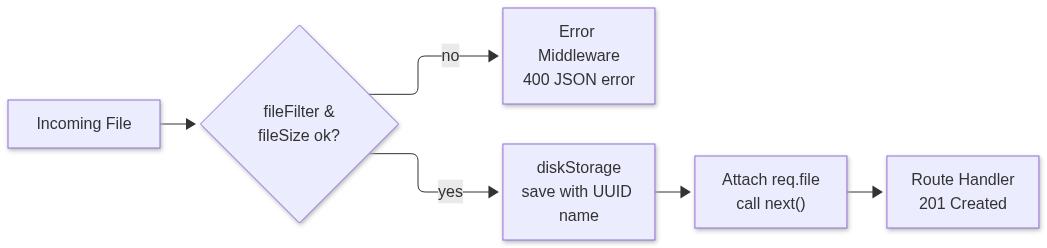
limits: { fileSize: 1024 }, // 1 KB for this local demo; raise for real images
fileFilter: (req, file, cb) => {
if (!mimeToExt[file.mimetype]) {
const err = new Error("Unsupported file type");
err.status = 400;
return cb(err);
}
cb(null, true);
},
});
module.exports = { upload, uploadDir };
```
`diskStorage` takes two callbacks:
- **`destination`** decides which folder receives the file.
- **`filename`** decides the saved name on disk. Generating a UUID and mapping the extension from an allowlist (instead of `file.originalname`) prevents overwrites and stops a spoofed `.html` filename from being served as HTML.
Multer also ships `multer.memoryStorage()`, which skips the disk and keeps the uploaded bytes in RAM as a `Buffer` on `req.file.buffer`. That is handy when you want to resize an image in memory or forward it straight to object storage, but never use `memoryStorage` without a strict `limits.fileSize` — a few large uploads can exhaust Node's heap and crash the process.
## Handling a single file upload
Attach `upload.single("avatar")` to the route. The string `"avatar"` must match the field name the client uses in `` or `formData.append("avatar", file)`:
```js
// server.js
const express = require("express");
const multer = require("multer");
const { upload, uploadDir } = require("./upload");
const app = express();
app.use("/uploads", express.static(uploadDir));
app.post("/avatar", upload.single("avatar"), (req, res) => {
if (!req.file) return res.status(400).json({ error: "No file uploaded" });
res.status(201).json({
fieldname: req.file.fieldname,
originalname: req.file.originalname,
mimetype: req.file.mimetype,
size: req.file.size,
url: `/uploads/${req.file.filename}`,
});
});
```
Sending a 9-byte PNG under the `"avatar"` field (`client.js` is shown in the security section below) returned:
```text
201 {"fieldname":"avatar","originalname":"profile.png","mimetype":"image/png","size":9,"url":"/uploads/1795520379122-03a176cb-e6e3-4475-9aaa-1c686a50d9a3.png"}
```
If the client sends the file under `"image"` instead of `"avatar"`, Multer rejects the request with `LIMIT_UNEXPECTED_FILE`. Any accompanying text fields from the same multipart form are still populated on `req.body` once Multer finishes parsing.
## Handling multiple file uploads
Use `upload.array("photos", 3)` to accept up to 3 files under the same field name. Multer attaches an array to `req.files` instead of `req.file`:
```js
app.post("/photos", upload.array("photos", 3), (req, res) => {
if (!req.files || req.files.length === 0) {
return res.status(400).json({ error: "No files uploaded" });
}
res.status(201).json({
count: req.files.length,
files: req.files.map((f) => ({ originalname: f.originalname, size: f.size })),
});
});
```
Uploading two JPEGs (`one.jpg` and `two.jpg`) returned:
```text
201 {"count":2,"files":[{"originalname":"one.jpg","size":4},{"originalname":"two.jpg","size":5}]}
```
If a form has different file fields (such as one `avatar` and two `gallery` images), Multer also provides `upload.fields([{ name: "avatar", maxCount: 1 }, { name: "gallery", maxCount: 2 }])`. Here is how the three methods compare:
| Method | Populates | Typical use |
|---|---|---|
| `upload.single("avatar")` | `req.file` (one object) | Profile picture, resume PDF |
| `upload.array("photos", 3)` | `req.files` (array of objects) | Product gallery, multi-photo post |
| `upload.fields([...])` | `req.files` (object keyed by field name) | Mixed forms (e.g., cover + attachments) |
## Serving uploaded files
Because we mounted `app.use("/uploads", express.static(uploadDir))` above, any file saved inside `uploads/` is reachable at `/uploads/`. Fetching the URL returned from our `/avatar` upload gave:
```text
200 image/png hello png
```
Express set the `Content-Type: image/png` header automatically from the file extension and streamed the saved bytes back to the client.
When you save upload metadata in a database, store only the generated filename or relative path (`/uploads/1795520379122-....png`), not a hardcoded host like `http://localhost:3000/...` — that way moving from local development to a real domain or CDN does not break stored links. For non-image downloads such as CSVs or user-uploaded documents, send them through a route that sets `Content-Disposition: attachment` (or `res.download(...)`) so the browser downloads the file instead of trying to render it inline.
## Security essentials for file uploads
File upload endpoints accept untrusted bytes directly onto your server. Add an Express error handler so Multer errors return clean JSON `400` responses instead of HTML pages:
```js
app.use((err, req, res, next) => {
if (err instanceof multer.MulterError) {
return res.status(400).json({ error: err.code, message: err.message });
}
if (err.status === 400) {
return res.status(400).json({ error: err.message });
}
res.status(500).json({ error: "Internal server error" });
});
app.listen(3000, () => console.log("Listening on http://127.0.0.1:3000"));
```
Every upload result in this post came from this test client. Run `node server.js` in one terminal and `node client.js` in another. The "PNG" is only the nine bytes of text `hello png` named `profile.png`, which is enough for Multer, and your saved filename will differ because it contains a timestamp and a UUID:
```js
// client.js (run while server.js is listening; uses Node's built-in fetch and FormData)
const base = "http://127.0.0.1:3000";
async function send(path, files, fields = {}) {
const form = new FormData();
for (const [name, value] of Object.entries(fields)) form.append(name, value);
for (const [field, filename, type, content] of files) {
form.append(field, new Blob([content], { type }), filename);
}
const res = await fetch(base + path, { method: "POST", body: form });
return `${res.status} ${await res.text()}`;
}
(async () => {
const saved = await send("/avatar", [["avatar", "profile.png", "image/png", "hello png"]]);
console.log(saved);
const url = JSON.parse(saved.slice(4)).url;
const file = await fetch(base + url);
console.log(file.status, file.headers.get("content-type"), await file.text());
console.log(await send("/photos", [
["photos", "one.jpg", "image/jpeg", "abcd"],
["photos", "two.jpg", "image/jpeg", "abcde"],
]));
console.log(await send("/avatar", [["avatar", "big.png", "image/png", "x".repeat(2048)]]));
console.log(await send("/avatar", [["avatar", "evil.js", "application/javascript", "alert(1)"]]));
})();
```
The last two requests send a 2 KB file (over our 1 KB limit) and a `.js` file (`application/javascript`). Real output:
```text
400 {"error":"LIMIT_FILE_SIZE","message":"File too large"}
400 {"error":"Unsupported file type"}
```
Four rules to enforce on every upload route:
1. **Always set `limits.fileSize`** (and a max file count in `upload.array`) so a single request cannot fill your disk or memory.
2. **Never trust `file.originalname` as a disk path.** A malicious name like `../../server.js` or a duplicate name can overwrite files; generate a UUID filename instead.
3. **Restrict allowed types with `fileFilter`.** Keep in mind that `file.mimetype` comes from the client's request headers and can be spoofed — for stricter security, inspect the file's leading magic bytes after upload.
4. **Never serve user-uploaded `.html` or `.js` files from your app's own domain**, or an attacker can run scripts inside your users' browsers (stored XSS).
## When NOT to store uploads on local disk
Local `diskStorage` is great for learning and small single-server apps, but it breaks down in production when:
- You run on ephemeral containers or serverless platforms (local disk wipes on every redeploy).
- You run multiple Node.js instances behind a load balancer (a file saved on Server A returns `404` when Server B serves the next request).
- Users upload very large files (hundreds of megabytes), where direct browser-to-object-storage uploads via pre-signed URLs avoid routing heavy binary traffic through Express at all.
In those setups, stream uploads to object storage (such as S3, Google Cloud Storage, or Cloudflare R2) rather than keeping them in a local `uploads/` folder.
## Where this leaves you
`express.json()` handles JSON; Multer handles `multipart/form-data`. Configure `diskStorage` with generated filenames, use `upload.single()` or `upload.array()` on your routes, enforce `limits` and `fileFilter`, and serve saved files carefully via `express.static`.
One honest limit: this post stays on local disk storage and checks `file.mimetype` headers without magic-byte verification or cloud object storage streaming. What is the first upload bug you ran into with Multer — mismatched field names (`LIMIT_UNEXPECTED_FILE`), missing `uploads/` folder, or `req.file` being `undefined`?