# A Browser Without the Browser: Getting Started with cURL
When you open a website, your browser sends a short text message to a server, gets a text message back, and draws a page from it. You never see either message. curl sends the same kind of message from your terminal and prints the reply exactly as it arrived:
```bash
curl https://example.com
```
```text
...Example Domain...
```
That's the same HTML your browser turns into the "Example Domain" page, just not drawn. curl is a browser without the browser, and that's what makes it useful: nothing hidden, nothing rendered, only the request and the response. This post takes you from that first command to sending data to an API. Every command below was run with curl 8.22 on Windows 11. The output is real, trimmed where it was long.
## Servers, and why you'd talk to one
A **server** is a program running on some computer, waiting for requests. It might send back a web page, a list of products as data, or "you're logged in". Your browser talks to servers. So does every app on your phone, and so do servers talking to each other.
All of them use the same format, **HTTP**: a request goes out, a response comes back. If you can send an HTTP request yourself, you can talk to any of those servers directly, without building a page or an app first.
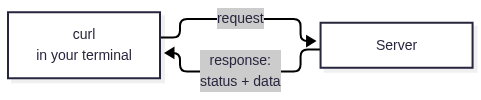
*One request out, one response back.*
## What curl is
curl is a command-line tool that sends a request to a URL and prints what comes back. It ships with current versions of Windows 10 and 11, macOS, and most Linux systems. Check yours:
```bash
curl --version
```
```text
curl 8.22.0 (Windows) libcurl/8.22.0 Schannel zlib/1.3.2 WinIDN WinLDAP
```
If you're in **PowerShell on Windows**, type `curl.exe` instead of `curl` for every command in this post. There's a good reason for that, covered in the mistakes section below.
A browser and curl send the same kind of request. The difference is what happens to the response:

*Same request. The browser keeps going and draws; curl stops and prints.*
## Your first request
You've already seen it:
```bash
curl https://example.com
```
No flags, no options. curl sent a request for the page and printed the reply: one long line of HTML. A browser would go on to fetch the CSS, scripts and images that HTML mentions. curl stops at the first response. That's the point.
## Reading the response
The HTML was only the **body** of the response. There's more in front of it. Add `-i` (include) to see everything:
```bash
curl -i https://example.com
```
```text
HTTP/1.1 200 OK
Date: Mon, 23 Nov 2026 09:32:51 GMT
Content-Type: text/html; charset=utf-8
Connection: keep-alive
Server: cloudflare
...
```
Three parts:
- **Status line**: `HTTP/1.1 200 OK`. The number is the result: `200` means success, `404` means not found, `500` means the server broke.
- **Headers**: information *about* the response. `Content-Type: text/html` says the body is a web page.
- **Body**: after the blank line, the actual content.
Your request has the same shape. `-v` (verbose) shows both sides; lines starting with `>` are what curl sent, `<` is what came back:
```text
> GET / HTTP/1.1
> Host: example.com
> User-Agent: curl/8.22.0
> Accept: */*
>
< HTTP/1.1 200 OK
< Content-Type: text/html; charset=utf-8
```
`GET` is the **method**: "give me this". `/` is the path. The rest are request headers.

*A request and a response have the same three parts: a first line, headers, and a body.*
## Talking to an API: GET
A website returns pages for people. An **API** returns data for programs, usually as JSON. Same request, different kind of answer. JSONPlaceholder is a free fake API for practice:
```bash
curl https://jsonplaceholder.typicode.com/todos/1
```
```json
{
"userId": 1,
"id": 1,
"title": "delectus aut autem",
"completed": false
}
```
That's one to-do item as data. A frontend would read those fields and show them; you're seeing what it would receive. When an app shows the wrong thing, this is how you check whether the API sent the wrong data or the app displayed it wrong.
## Sending data: POST
`GET` asks for something. `POST` sends something: a new user, a form, an order. You need three extra pieces:
```bash
curl -X POST https://httpbin.org/post \
-H "Content-Type: application/json" \
-d '{"name":"Asha","course":"web-dev"}'
```
- `-X POST`: the method.
- `-H`: a header. `Content-Type: application/json` tells the server the body is JSON.
- `-d`: the data, the request body.
httpbin.org echoes back what it received, which is handy for checking your request (trimmed):
```json
{
"headers": {
"Content-Type": "application/json",
"User-Agent": "curl/8.22.0"
},
"method": "POST",
"json": {
"course": "web-dev",
"name": "Asha"
}
}
```
The server got a POST, knew it was JSON, and parsed both fields. (`-d` on its own already switches curl to POST, so `-X POST` is technically optional. Writing it makes the command easier to read.)
## Common mistakes beginners make
**1. `curl` in Windows PowerShell isn't curl.** In Windows PowerShell 5.1, `curl` is an alias:
```powershell
Get-Alias curl
```
```text
CommandType Name Definition
----------- ---- ----------
Alias curl Invoke-WebRequest
```
So `curl -i https://example.com` runs a different command with different options, and fails with `Cannot process command because of one or more missing mandatory parameters: Uri.` Type `curl.exe` and you get the real tool. (PowerShell 7 dropped this alias, but Windows PowerShell 5.1 is still the one that opens by default.)
**2. JSON quotes disappearing on Windows.** In PowerShell 5.1, I sent `-d '{"name":"Asha"}'` to `curl.exe`. httpbin received `{name:Asha}`: the double quotes were stripped before curl saw them, so it wasn't valid JSON anymore. Escaping them works: `-d '{\"name\":\"Asha\"}'`. In `cmd.exe`, single quotes don't group anything, so use `-d "{\"name\":\"Asha\"}"`. On macOS and Linux, the single-quoted version from the POST section works as written.
**3. Forgetting `Content-Type` on a POST.** Without the `-H` line, curl labels the body as form data:
```text
Content-Type: application/x-www-form-urlencoded
json: None
```
The server didn't parse the JSON at all. Many APIs will reject the request or ignore the body.
**4. Getting an empty page from a redirect.** Many sites redirect `http://` to `https://`. curl doesn't follow redirects unless you ask:
```bash
curl -i http://github.com
```
```text
HTTP/1.1 301 Moved Permanently
Content-Length: 0
Location: https://github.com/
```
An empty body. Add `-L` (location) and curl follows the redirect to the real page.
**5. Assuming curl fails on a 404.** It doesn't. curl's job is to get a response, and a `404` *is* a response. `curl https://httpbin.org/status/404` exited with code `0`, meaning success. Add `--fail` and it exits with `22` and prints `The requested URL returned error: 404`. That matters the moment you use curl in a script.
## Where curl fits in backend development
Backend work is mostly building things that answer requests. curl lets you send those requests before anything else exists:
- **Testing an endpoint before the frontend is built.** Write the API, curl it, check the JSON.
- **Reproducing a bug.** "The app shows nothing" becomes one command whose response you can read.
- **Copying a request from the browser.** In Chrome DevTools, open the Network tab, right-click a request and choose **Copy → Copy as cURL** (on Windows there are `cmd` and `bash` versions; pick the one for your shell). You get the browser's exact request as a curl command you can rerun and change.

*curl talks to your API the same way your frontend does, so you can test it before the frontend exists.*
curl isn't the right tool for everything. For saved collections of requests, or teammates who prefer a form to a command line, a GUI client like Postman is easier to share. For a quick "what does this endpoint actually return?", curl is already installed and gets you the answer fastest.
The takeaway: **curl sends the same request your browser would and shows you the raw response.** Once you can read a status line, headers and a body, every API is just a URL to try. This post stuck to GET and POST; PUT, DELETE, authentication headers and file uploads use the same `-X`, `-H` and `-d` pieces you've already seen. If you want to know what happens underneath that request, I covered it in [TCP vs UDP and where HTTP fits](https://jaydeepkanzariya.hashnode.dev/tcp-vs-udp-and-http).
Pick a site you use, open DevTools, and "Copy as cURL" one request. What headers does your browser send that you never knew about?